Additional best practices information
This section describes some best practices which - although not specifically concerned with rule syntax, will help improve performance.
Use mass data calculation
As described, the new rules engine internally retrieves the data for calculation in big blocks. If values can be reused (for example, currency conversion factors are the same for all products), then they are retrieved only once. Therefore, it is important to use mass operations instead of single cell operation.
There is a second reason to prefer mass operations over single cell operations. When working in a network environment, each single cell request travels on its own over the network. In the case of 100 cells, the network latency between the client and the server is multiplied 100 times. With mass operations, network latency has only minimal effect. For example:
- Use DBGetC instead of DBGet
- Use CellGetC or MDXExecute instead of CellGet
- Use ad-hoc reports or Alea ad-hoc reports
- Do not loop and retrieve single cell values. Instead, create a data area and loop over its results.
Monitor memory consumption
The new OLAP Server calculates with big blocks of data, there might be peaks in the memory consumption based on the calculations of the user. It is suggested that you monitor the virtual bytes and their peak on the MIS.Alea.Server process.
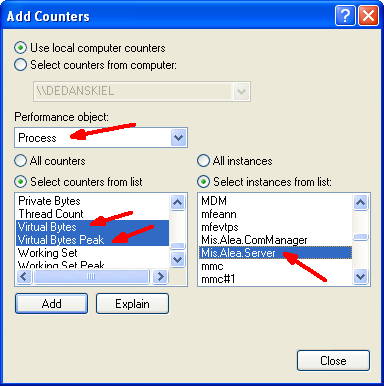
The performance counters might be named differently in different versions of the Windows operating system.
The goal is to ensure that the OLAP Server does not hit the 2 or 3 GB limit per process on a 32 bit Windows system, and that Windows does not start swapping.
You can influence the memory needed in the calculation. See 'Configuration' for more details.
Rule debugging support
The OLAP Server can provide some information on how a given cell is calculated. This information can be retrieved through cell notes. If a cell note contains the content "value?", then the OLAP Server returns calculation information in the cell note.
To try this out, open an Alea ad-hoc report in Office Plus showing the cell you want to research. Open a cell note and add the string "value?". Do not add any other characters or new lines. Save the cell note and reopen it.
On a consolidated cell, you might see information like this:
value?
---Cell Coordinates -------------------------------
YEARS	2002
ACTVSBUD	Actual
REGIONS	World
PRODUCTS	Total
MONTHS	Year
MEASURES	Units
Internal Key:	1	1	34	61	13	1
External Key:	1	1	1	1	1	1
---------------------------------------------------------
Cell Type: Calculated
Consolidated by:
REGIONS:'World' 33 - Base Descendants
PRODUCTS:'Total' 60 - Base Descendants
MONTHS:'Year' 12 - Base Descendants
Total consolidated cells: 23760
The first part gives you the coordinates of the cell, with the dimension and element names. It also contains an internal and an external key. The external key relates to the id of the element in the dimension.
The second part indicates that this is a calculated element. Moreover it states from how many base descendants it is calculated. This cell value is consolidated from 23760 base cells.
For a cell calculated by rule, the information has some differences:
value?
---Cell Coordinates -------------------------------
YEARS	2002
ACTVSBUD	Actual
REGIONS	World
PRODUCTS	Total
MONTHS	Year
MEASURES	Average price
Internal Key:	1	1	34	61	13	2
External Key:	1	1	1	1	1	2
---------------------------------------------------------
Cell Type: Calculated
Rule: ['Average price']=['Sales']/['Units'];
---Optimized Rule References-----------------------
['Sales']
['Units']
---------------------------------------------------------
Again, the second part indicates that the value is calculated, but this time by rule. The rule is displayed.
General advice on performance testing
An important part of improving the performance of your rules is to implement reliable performance measurement. Only if this is available can the performance or the improvements be judged. This topic highlights some steps in performance testing:
- Make the performance reproducible.
This is the most important step. Ensure that you always measure performance by using the same report with the same selections, running under the same user credentials.
- Ensure that the values are not cached.
If the OLAP Server has calculated the values previously, then they are cached and the server responds much faster. Consider emptying the cache before you do the measurement. But do not disable the cache, as this will change the calculation behavior.
- Identify relevant rules for your report.
To work on the correct rule, use the "value?" functionality in order to understand how a value is calculated. Sometimes it helps to disable rules entirely to understand if they have a significant effect on the calculation time.
- Record implemented changes and their effects.
This will help you to understand how your changes affect performance.
- Implement one change after another.
By implementing the changes one by one and testing their effects, you can understand the results of your changes.
- Check the results.
After changing your rules, compare the results on your report with the calculation from the original rules to ensure that you have not accidentally introduced an error into the rule definition.
- Be patient.
Performance testing might take some time. But the more experience you gain, the easier it will be.