Artifact tree
For each update, the clock retrieves its Update artifacts from the Artifact folder.
The folder tree uses this structure:
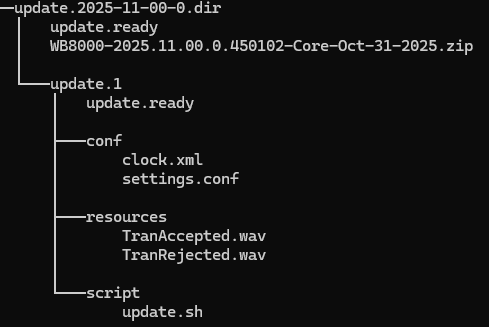
Top level
- /update.XXXX-XX-XX-X.dir: The folder name represents the target application version of the update target. For example, /update.2025-11-00-0.dir.
- The folder must contain two types of content:
- Application update artifact .zip file: The application version must match the top-level folder name. For example, WB8000-2025.11.00.0.450102-Core-Oct-31-2025.zip or WB9000-2025.11.00.0.450102-Core-Oct-31-2025.zip.
- The Update.X folder.
Second level
- /update.XXXX-XX-XX-X.dir/update.X: This folder contains sub-folders for configuration, resource, and script update artifacts.
- If you push these three update types without updating the clock application, create a new update.X folder under the same location with an incremented X number.
- If multiple update.X folders exist under the same /update.XXXX-XX-XX-X.dir, the clock retrieves the folder with the highest X number.
Third level
- /update.XXXX-XX-XX-X.dir/update.X/conf: This folder should contain the accepted artifacts for configuration updates.
See Configuration update.
- /update.XXXX-XX-XX-X.dir/update.X/resources: This folder should contain the accepted artifacts for configuration updates.
See Resource update.
- /update.XXXX-XX-XX-X.dir/update.X/scripts: This folder should contain the accepted artifacts for configuration updates.
See Script update.