Bid windows calculation
Before calculating bid windows, set up the schedule bid and specify the number of minutes for each bid window. When you calculate bid windows, the system places each bid window within the bid period based on the schedule bid configuration. You can then calculate when each employee's bid window occurs. To determine when employees can bid, the system compares the following values:
-
The number of employees in the bid group.
-
The number of bid windows available within the bid period.
This diagram shows the elements that determine the bid windows and the employees that are assigned to them:
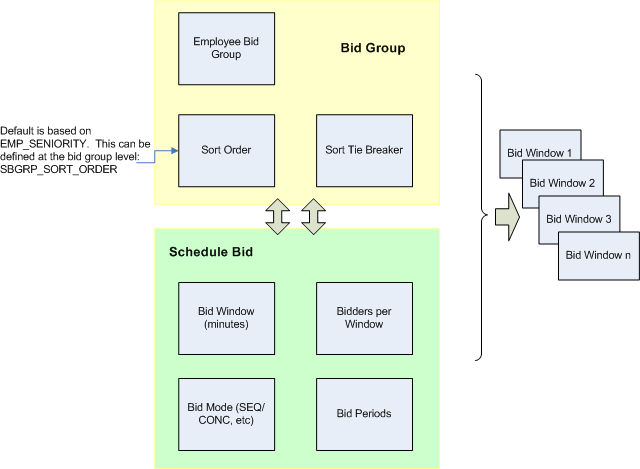
You can restrict the bid windows that the Calculate Bid Windows action generates by configuring these team-level configuration keys on the Configuration Keys maintenance form:
-
SB_WINDOW_BLACKOUT_DAYS (Blackout days): a comma-delimited list of weekday names, for example, Saturday, Sunday. Bid windows are not generated on the specified days.
-
SB_WINDOW_BLACKOUT_TIMES (Blackout times): a 24-hour format time range, for example, 00:00-06:00. Bid windows are not generated during the specified time range.
-
SB_WINDOW_START_DAY (Bidding start day): a weekday name, for example, Monday. Bid windows are generated on or after the specified day.
All three keys are blank by default. If you leave all three keys blank, the existing bid window calculation behavior is preserved. All three settings are interpreted according to the configured bidding time zone
Multi-team bids
A schedule bid can include employees from multiple teams. If the teams have different configuration key values, the most restrictive combination is applied:
-
The union of all blackout days
-
The widest blackout time range (earliest start time and latest end time)
-
The latest bidding start day
Pausing and recalculating windows
You can pause a schedule bid and recalculate its bid windows. Recalculation affects only future bid windows. Previously completed bid windows are preserved.