Infor Operations and Regulations Mobile architecture
This diagram provides a high-level overview of the Infor Operations and Regulations Mobile system architecture:
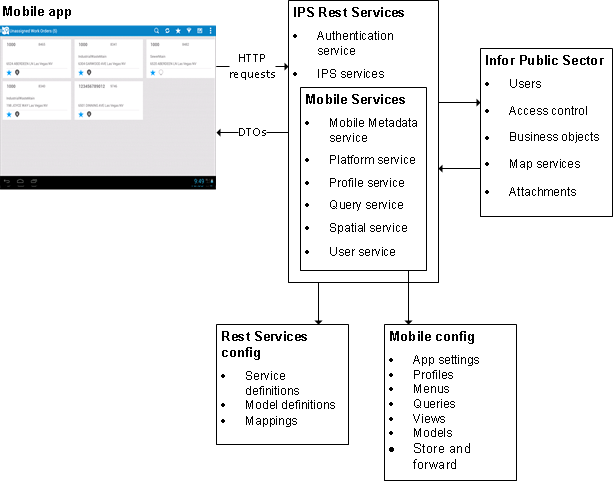
Mobile app
The Infor Field Inspector app is a free download. The Android version of the app is available at the Google Play store, the Windows version is available at the Microsoft app store, and the iOS version is available at the iTunes app store. After you've installed the app on your mobile device, you must connect to an Infor Operations and Regulations Rest Services site to use it.
Rest Services
The Mobile app uses Infor Operations and Regulations Rest Services to communicate with the back office. Rest Services are next generation web services that support integrations and extensions to Infor Operations and Regulations. Rest Services use the HTTP protocol, so all interactions between the app and the services are in the form of HTTP requests and responses.
The Rest Services use data transfer objects (DTOs) to transfer data to the mobile device. A DTO contains a set of structured data rather than a single record, so the use of DTOs reduces the number of round trips between the mobile device and the server.
To log in to the app, you enter the URL of the Rest Services site and your Infor Operations and Regulations user name and password.
Mobile services
The Mobile services are a set of services designed to support the mobile app. They are included in the Rest Services installation.
- The Mobile Metadata service manages the data that the mobile app uses.
- The Platform service manages the different platforms that Infor Operations and Regulations Mobile supports, such as Android and Windows.
- The Profile service manages user profiles for the mobile app.
- The Query service invokes queries and returns record sets to the mobile app.
- The Spatial service handles GIS information.
- The User service gets user and employee information from Infor Operations and Regulations.
Infor Operations and Regulations
The Rest Services use the Infor Operations and Regulations business objects to connect to the database. Each table in the database has a corresponding business object that provides data access and contains code for processing records in that table.
For example, the CDR.Building.BuildingApplication object provides access to the CDR.BUILDING.BLDGAPPL table. The object contains code for basic tasks such as adding and updating building applications, and for more advanced tasks such as checking the status of an application to determine if it can advance to the next milestone.
The mobile app connects to the same database as Infor Operations and Regulations. Records added and updated in the app can also be seen in the back office, and vice versa.
For example, an employee in the office uses the standard browser-based GUI to advance a building application to the next milestone. An inspection is added at the new milestone, and a field inspector uses the mobile app to download the inspection. After the inspector has completed the inspection, the results can be seen in the Building Inspection InfoViewer or the Building Application InfoViewer in Infor Operations and Regulations.
Rest Services configuration
The Rest Services configuration is an XML configuration file that defines settings for the Rest Services. The configuration is found in the Rest Services application directory, and is edited using the Configuration Editor.
Mobile configuration
The Mobile configuration is another XML configuration file in the Rest Services directory. This configuration defines the structure and content of the mobile app.
- Profiles are used to personalize app content for different users, and to control access within the app. When logging in to the app for the first time, each user is required to choose a profile. For example, one profile might be defined for building inspectors and another for code enforcement supervisors. The profile defines the items that are displayed in the app menu and the access rights that the user has within the app.
- The menu in the mobile app provides access to a selection of queries, such as My Building Inspections or Nearby Open Cases. Because different users will require access to different information, you can define a separate menu for each user profile.
- Queries are used to look up sets of records in the database and show them in the mobile app.
- Views define the user interface of the mobile app. Each view represents a page or part of a page.
- Models define the data structure that the mobile app uses. They are associated with both queries and views.
- The Mobile configuration also defines store and forward settings for the mobile app. These settings specify which data gets downloaded and stored on the mobile device so that the app can be used without an Internet connection.