Modifying the card view
When using the card view to view permits or cases in the mobile app, you may find that the permit or case number is partially hidden by the record type icon. This is because the permit or case number is too long to fit in the available space.
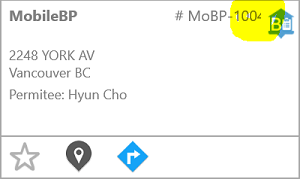
To correct this, you may want to modify the card view. In the Mobile configuration, the layout of the cards is defined in a "GridCell" view for each CDR module, such as CDR_Building_Application_GridCell for Building Permits.
One solution is to swap the application type and the application number in the card header, because the application type is generally shorter. To do this, find the gbHeader group box in the configuration. Within this group box, another group box called gbRecordTypeSection is used to display the application type, and a group box called gbRecordIdentifierSection displays the application number. To swap the labels in the card, reverse the order of these group boxes.
Another option is to remove the record type icon. To do this, delete the gbRecordType group box.
Finally, you can change the font size by editing the CSS stylesheet. There is a stylesheet for each platform, found in the Resources\Mobile folder in the Rest Services application directory:
- IOSStyles.css for iOS
- Styles.css for Android
- WindowsStyles.css for Windows
The CssClass attribute for each group box specifies the class in the stylesheet that defines the font size.