Configuring menus
In the configuration, both the groupings and the queries are defined separately so they can be reused in multiple menus. This diagram shows how groupings and queries can be reused.
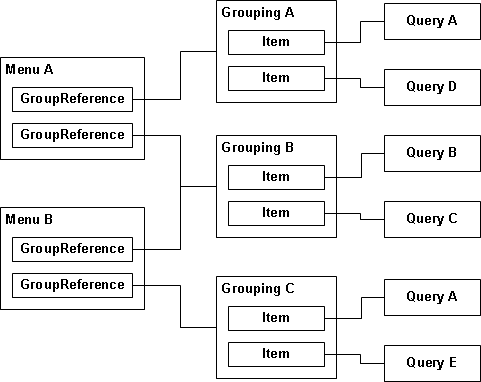
The diagram shows two menus, A and B. Each menu shows two groupings. Menu A shows grouping A and grouping B, and menu B shows grouping B and grouping C. The groupings are defined separately from the menus, and associated with the menus through GroupReference elements in the configuration. Both menu A and menu B have a GroupReference that points to grouping B.
Similarly, both grouping A and grouping C include query A. Again, the queries are defined separately in the configuration. In this case, queries are associated with groupings through Item elements. Both grouping A and grouping C include an Item that points to query A.
The next diagram is a more detailed example of a menu configuration, showing the BuildingInspections menu. First, both the BuildingInspector profile and the BuildingInspectorSupervisor profile use the same menu. In the configuration, the Menu attribute of the element specifies which menu the profile will use.
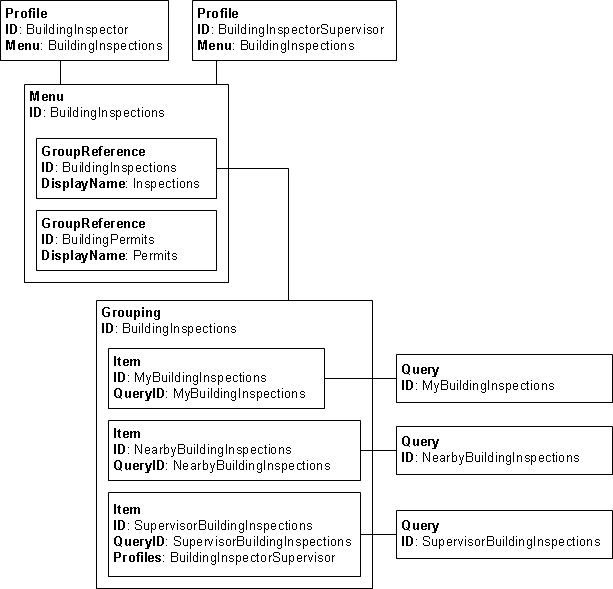
The BuildingInspections menu has two nodes. The DisplayName attribute of each specifies the name that is displayed in the menu, and the ID attribute specifies the grouping to be displayed.
The diagram only shows the BuildingInspections grouping, but the BuildingPermits grouping is similar. This grouping includes three nodes, each of which points to a query defined under the node in the configuration. The QueryID attribute of each Item specifies the query to show.
Note also the Profiles attribute on the SupervisorBuildingInspections item. Because two different profiles use the same menu, the Profiles attribute is used to limit access to this item. Only users in the BuildingInspectorSupervisor profile will see this item in the menu.