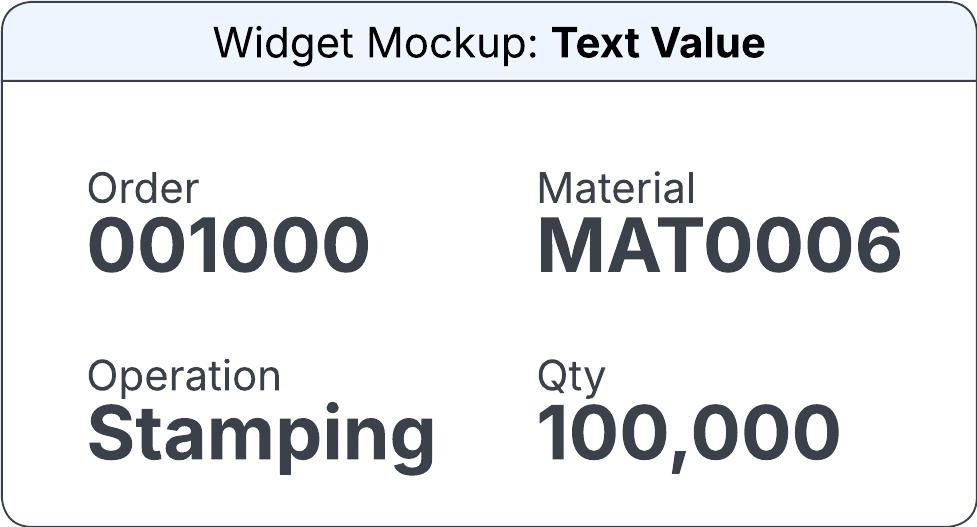
Text Value widget
The widget displays the output caption and the value for an output field. You can manually specify the caption and the content to be displayed on the widget, using the output fields. You can select the text color, font size, and font weight.
You can specify this information in the Configure Text Value Widget section on the Widget Builder screen:
- Data Source
- The data source for the text value widget.
- Horizontal Alignment
-
The horizontal position of the text value in the allocated space. Possible values:
- Left
- Centre
- Right
- Vertical Alignment
-
The vertical position of the text value in the allocated space. Possible values:
- Top
- Centre
- Bottom
- Output Field
- The output field that determines the text to be displayed on the widget. If this field is specified, the Source (Caption) and Source (Content) fields are not displayed.
- Source (Caption)
-
The source from which the caption is displayed on the widget. Possible values:
- Output Field
- Glossary Term
- Editbox
- Output Field
- The output field from which the caption is displayed on the widget. This field is displayed only if the Source (Content) field is set to Output Field.
- Caption Glossary Term
- The glossary term from which the caption is displayed on the widget. This field is displayed only if the Source (Content) field is set to Glossary Term.
- Caption Glossary Property
- The caption to be displayed on the widget. This field is displayed only if you select the Caption Glossary Term field.
- Edit Box
- The caption to be displayed on the widget. This field is displayed only if the Source (Content) field is set to Editbox.
- Source (Content)
-
The source from which the content is displayed on the widget. Possible values:
- Output Field
- Glossary Term
- Editbox
- Output Field
- The output field from which the content is displayed on the widget. This field is displayed only if the Source (Content) field is set to Output Field.
- Content Glossary Term
- The glossary term from which the text is displayed on the widget. This field is displayed only if the Source (Content) field is set to Glossary Term.
- Content Glossary Property
- The text to be displayed on the widget. This field is displayed only if you select the Content Glossary Term field.
- Edit Box
- The text to be displayed on the widget. This field is displayed only if the Source (Content) field is set to Editbox.
- Source (Colour)
-
The source from which the color of the widget is determined. Possible values:
- Output Field
- Colour
- Output Field
- The output field from which the color of the widget is determined. This field is displayed only if the Source (Colour) field is set to Output Field.
- Colour
- The color for the widget. You can select from pre-approved IDS colors. This field is displayed only if the Source (Colour) field is set to Colour.
- Font Size
-
The size of the text on the widget. Possible values:
- Small
- Medium
- Large
- Xlarge
- Font Weight
-
The text style to be displayed on the widget. Possible values:
- Regular
- Bold