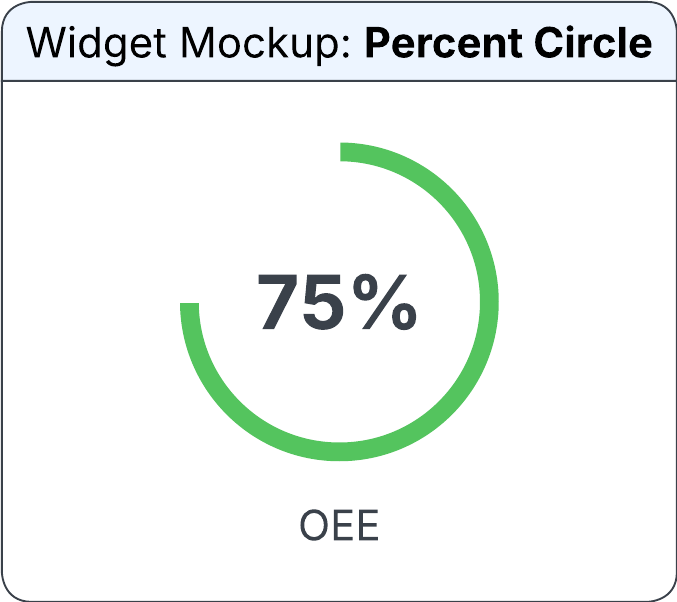
Percent Circle widget
The widget displays data in a circular format with a caption value in the center. This widget includes common configuration options available on the Widget Builder screen, such as the alignment and value settings. You can also specify the Out of Value and Target Value fields based on the requirement. You can select the color manually or apply conditional formatting from an output field.
You can specify this information in the Configure Percent Circle Widget section on the Widget Builder screen:
- Data Source
- The data source for the percent circle widget.
- Horizontal Alignment
-
The horizontal position of the percent circle in the allocated space. Possible values:
- Left
- Centre
- Right
- Vertical Alignment
-
The vertical position of the percent circle in the allocated space. Possible values:
- Top
- Centre
- Bottom
- Output Field
- The output field that the percent circle references on the widget. If this field is specified, the Colour and Track Colour sections are not displayed. The Colour field value displays foreground color and the Track Colour field value displays the background color.
- Value
- The output field from which the percent bar settings are determined.
- Source (Out Of Value)
-
The source from which the out of values is determined. Possible values:
- Output Field
- Editbox
- Output Field
- The value from which the out of value is defaulted. This field is displayed only if the Source (Out Of Value) field is set to Output Field.
- Edit Box
- The value to define out of value. This field is displayed only if the Source (Out Of Value) field is set to Editbox.
- Source (Target Value)
-
The source from which the target value for the percent circle is determined. This value is indicated by a small, dashed line within the percent circle widget. Possible values:
- Output Field
- Editbox
- Output Field
- The output field value from which the target value is determined. This field is displayed only if the Source (Target Value) field is set to Output Field.
- Edit Box
- The value for the target value. This field is displayed only if the Source (Target Value) field is set to Editbox.
- Source (Colour)
-
The source from which the foreground color of the percent circle is determined. Possible values:
- Output Field
- Colour
- Output Field
- The output field from which the conditional formatting is applied. This field is displayed only if the Source (Colour) field is set to Output Field.
- Colour
- The color of the percent bar to display. You can select from pre-approved IDS colors. This field is displayed only if the Source (Colour) field is set to Colour.
- Source (Track Colour)
-
The source from which the track color of a percent circle is applied. The background color of a percent bar remains fixed for the size of the percent circle. The progress color overlays this background as progress increases. Possible values:
- Output Field
- Colour
- Output Field
- The output field from which the conditional formatting is applied. This field is displayed only if the Source (Track Colour) field is set to Output Field.
- Colour
- The track color of the percent circle to display. You can select from pre-approved IDS colors. This field is displayed only if the Source (Track Colour) field is set to Colour.
- Source (Label)
-
The source from which the label is displayed in the percent circle. Possible values:
- Output Field
- Editbox
- Edit Box
- The number to be displayed on the widget. This field is displayed only if the Source (Label) field is set to Editbox.
- Output Field
- The output field from which the label is displayed on the widget. This field is displayed only if the Source (Label) field is set to Output Field.