Tool Usage
A history of tool usage is maintained for each tool. A tool usage record defines the period during which a tool is loaded in a machine and identifies when the tool is used as part of an active production run.
Each tool usage record includes this information:
- The date and time when the tool is loaded.
- The machine and position where the tool is loaded.
- The production run in which the tool is used.
- The date and time the tool is unloaded.
- The reason the tool is changed, if applicable.
- The calculated duration for which the tool is loaded.
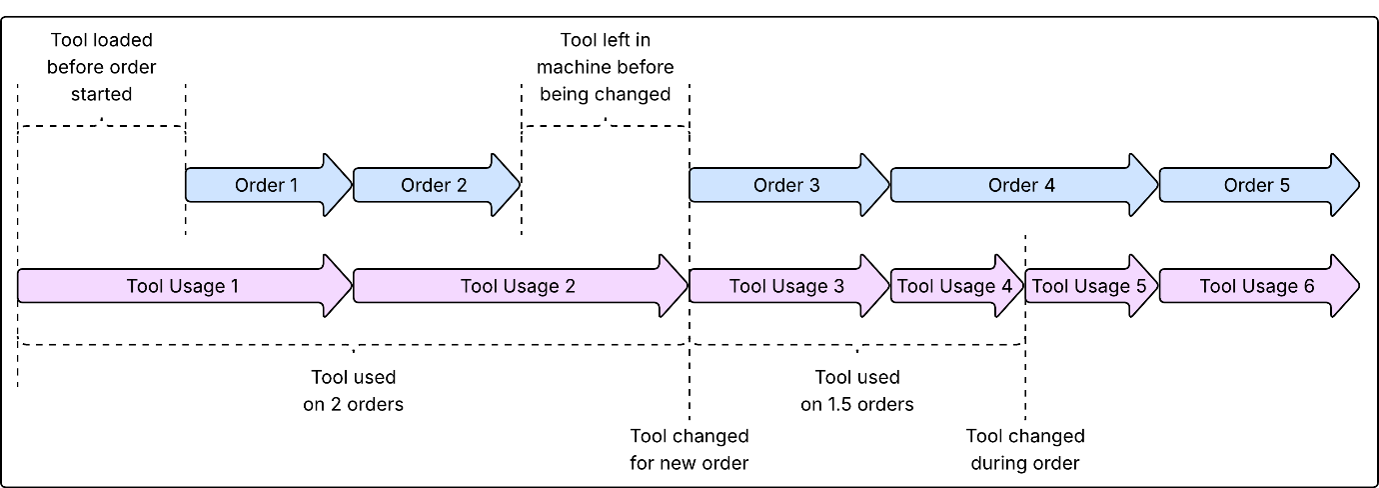
A tool usage record starts when a tool is loaded into a machine, regardless of whether a production run is active. A new tool usage record is created in these scenarios:
- The next production run requires a different tool: When the next production run requires a different tool, the existing tool usage record ends and a new record starts for the new tool at the start of the production run.
- The next production run uses the same tool: When the next production run starts and the same tool continues to be used, a new tool usage record is created at the start of the new production run. When the production run ends, the tool usage record remains active until the tool is unloaded or the next production run starts.
- The tool is changed during a production run: When a tool is changed during an active production run, the existing tool usage record ends and a new tool usage record starts for the replacement tool.
To determine how long a specific tool has remained in a machine, requires the tool usage records for each production run until a different tool is loaded.
For a tool pack, separate usage records are created for the tool pack and each associated sub-tool.
When a tool is loaded into a machine, the asset state of the tool is automatically set to in-use. When the tool is unloaded, the in-use state is removed, and the user can select the appropriate asset state for the tool.