Work-in-Progress Inventory
For a single production order that spans multiple production lines and operations, ERP typically recognizes only the finished material and does not manage inventory at each intermediate production step. The application manages this as Work-in-Progress (WIP) inventory.
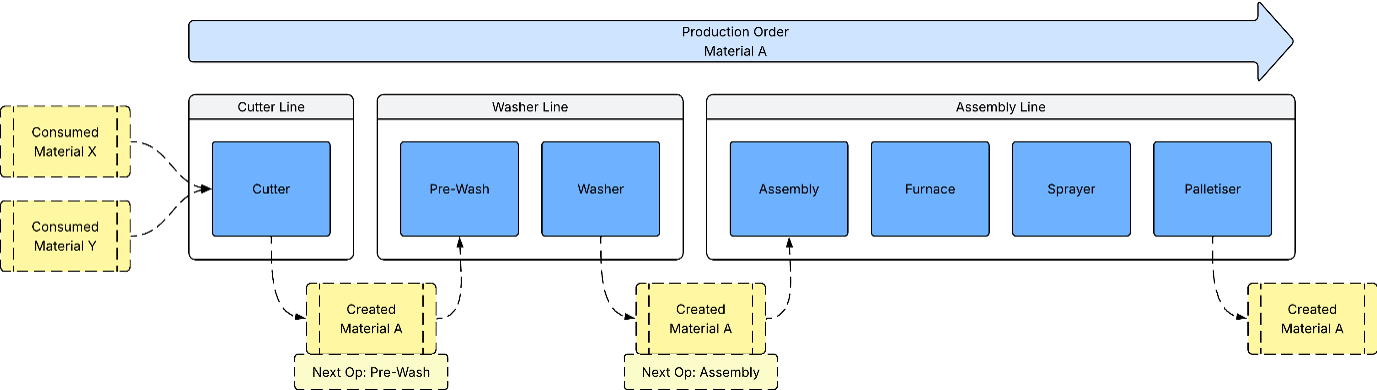
In the application, an inventory pack is first created on the first production line as WIP. Although the material of the inventory pack is associated with the final production order, the inventory pack is not yet complete as this must pass through subsequent production lines and operations. The application tracks the inventory pack as WIP throughout each production line.
As the inventory pack is processed through each operation, this remains classified as WIP. The application maintains visibility of the inventory, including material, state, quantity, and location. The application also tracks Next Routing Operation, which indicates the next step operation required in the production order. If the Next Routing Operation field is populated, the inventory pack is still in progress. If this field is empty, all required operations have been completed.
This approach allows to effectively manage and track inventory packs even when ERP does not recognize the intermediate inventory. WIP inventory is particularly important for processes that span multiple production lines, where each step must be performed sequentially.
After the inventory pack is processed through the final operation, the inventory transitions from WIP to finished material. At this point, confirmation is sent to ERP, where the inventory is formally recognized.
In summary, the inventory pack is initially created during the first production run of the order and is then processed through each subsequent production run for the same order. See Production Step Build Records.