Production Order & Production Run Statuses
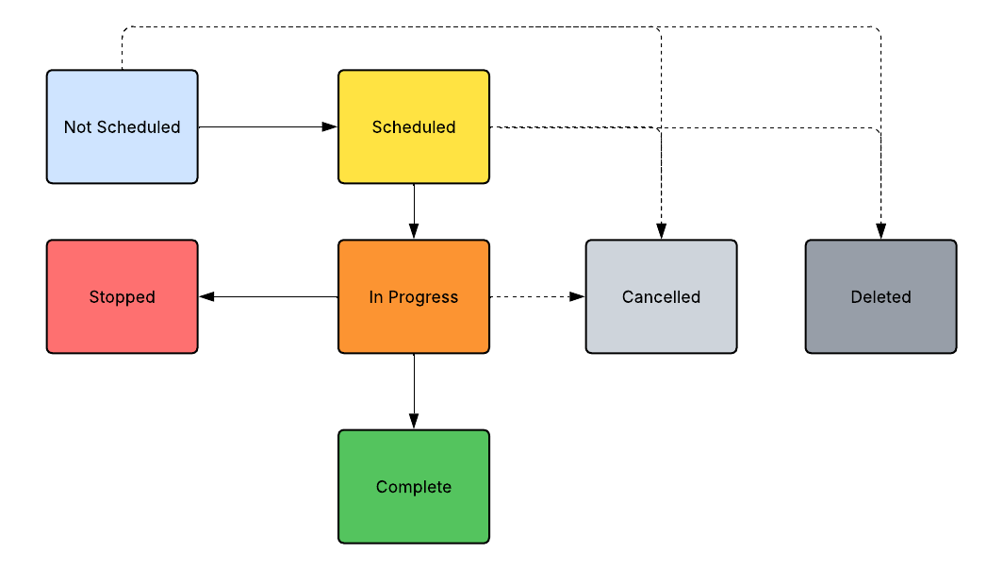
Production Orders and each associated Production Runs (Job) have a defined status. The status of the Production Order is determined through the status transitions of associated Production Runs. If a Production Order contains only one Production Run, both entities typically have the same status.
The list of available status options cannot be expanded through master data configuration. The options include:
- Not Scheduled (not applicable to Production Runs)
- Scheduled
- In Progress
- Stopped
- Complete
- Cancelled
- Deleted
Production Orders and Production Runs do not necessarily pass through every status during execution.
Status Transitions
The status of a Production Run:
- Begins in the Scheduled status
- Automatically transitions to In Progress when started
- Automatically transitions to Stopped or Complete when a Production Run is ended, depending on processing rules defined in the plant settings.
The status of a Production Order:
- Begins in the Not Scheduled status
- Automatically transitions to Scheduled when the first Production Run is created for the Order
- Automatically transitions to In Progress when the first Production Run is started for the Order
- Automatically transitions to either Stopped or Complete when a Production Run is ended and no Production Runs for the order remains in the Scheduled or In Progress status. The resulting status depends on the processing rules defined in the plant settings.
Note:
- Users can manually cancel the entire Production Order and all related Production Runs, at any stage of execution, if required.
- Users can manually delete:
- An individual Production Run in the Scheduled status.
- A Production Order in the Not Scheduled or Scheduled status, along with all associated Production Runs.