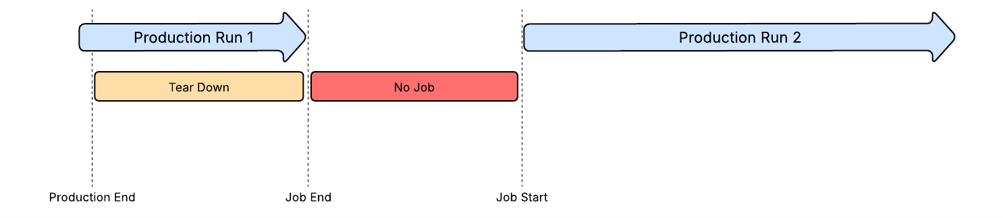
Production Stops
Production Stops represent any period during which an entire production line is not running. This can occur in the following situations:
- No production run is currently being executed on the production line.
- A production run is active; however, production has not started as the line is still in the setup or ramp-up phase.
- A production run is active, however, production is winding down prior to completion or before changing to a new order, such as during tear-down or cleaning activity.
Most production stops are managed automatically when jobs are started and ended. These transactions either:
- Manual actions performed by the operator
- Automatic data collection through OPC
- Automated integration with external systems
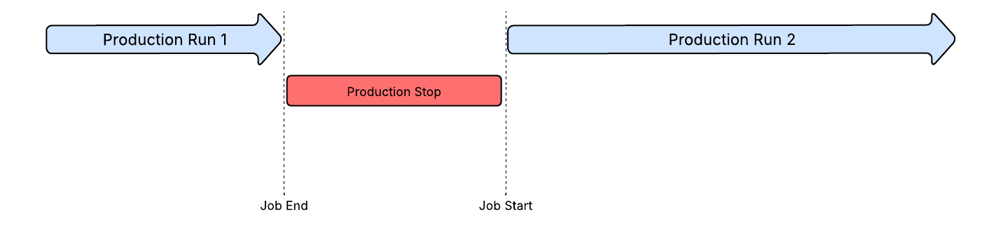
Production Stops that represent a period of non-production can be split to provide separate root causes to smaller periods of time within the overall stoppage.
By default, the application splits a production stop when a working shift ends and a non-working shift begins. Any time in the non-working shift is recorded as excluded time, which is then excluded in OEE calculations. When a non-working shift transitions back into a production shift, the stop automatically reverts.
Changeover
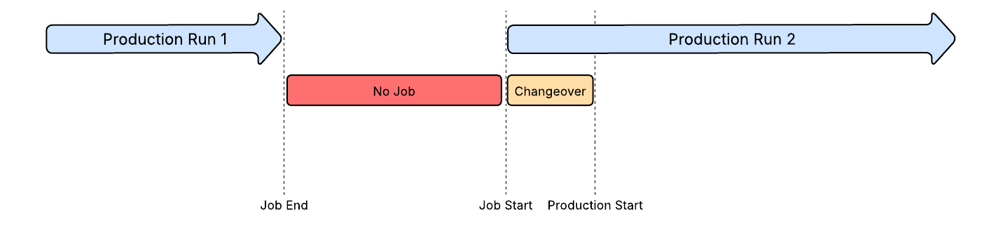
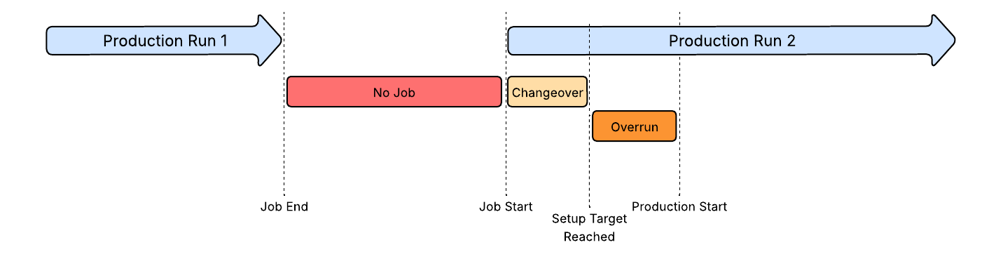
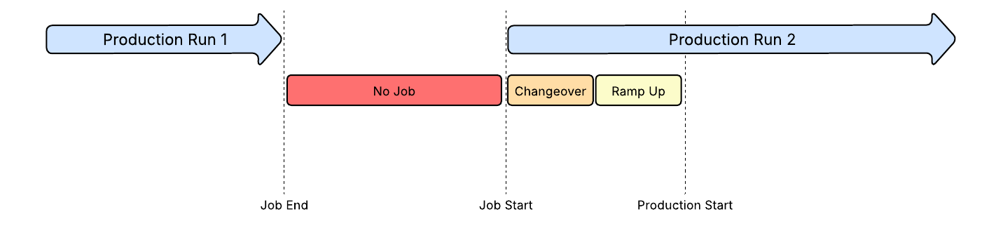
A changeover or setup period represents when the line is being prepared for a new production run. During this period, full production has not started, however, individual machines in the line can be started and stopped as part of the preparation process. A changeover is recorded as a production stop with a designated setup reason.
If the production line is configured to record setup, then a new setup period begins as soon as the production run starts. The production line is then in setup mode until the setup period is closed. The setup period can be closed in various ways, controlled by a setting on the line. See Setup Mode.
The target setup time is a fixed duration specified for the bottleneck routing operation however, can be overridden when a production order is scheduled. If the accumulated setup time exceeds the target setup time, then the dashboard prompts the operator to record the reason for the overrun. The period that exceeded the target duration can be split into multiple periods, if more than one root cause is identified.
Ramp-Up
Ramp-up is the period that follows completion of the setup period, where the machines are running slower than target speed while operators make minor adjustments and gradually increase the production line speed until reaching full speed. Ramp-up is recorded as a production stop with a designated reason code.
If the production line is configured to record ramp-up, a new ramp-up period automatically begins when the setup period ends. If no setup period is recorded, the ramp-up starts as soon as the production run begins. The production line remains in ramp-up mode until the ramp-up period is closed. The method for closing the ramp-up period depends on the Production line settings. See Ramp Up Mode.
The target ramp-up duration is defined as a fixed value on the bottleneck routing operation, however, can be overridden when a production order is scheduled.
If the ramp-up time exceeds the target time, then the dashboard prompts the operator to record the reason for the overrun. The period that exceeded the target duration can be split into multiple periods, if more than one root cause is identified.
Tear Down
Tear Down is a period at the end of a production run during which the production line is prepared for shutdown and ready for the next run. Typical tear-down activities include:
- Clearance of the production line
- Cleaning of the machines
- Removal of tooling, if not performed when new tooling is prepared
Tear Down is modeled as a production stop with a specific reason. The target tear-down time is defined as a fixed duration on the bottleneck routing operation, however, can be overridden when a production order is scheduled. If the actual tear-down time exceeds the target time, the dashboard prompts the operator to specify a reason for the overrun. This functionality may require additional work to be put in place.