Routing Operations
Routing Operations are the individual operations required to manufacture material.
Each routing operation defines the type of machine, and optionally specific machines, that can perform the operation along with details, such as input material, tooling, timings and targets.
Routing Operations contain key data that influence downstream production behavior.
Pass Name
When a routing defines multiple operations, however, the equipment used can perform subset of these operations at separate times for the same order. This can result in multiple production runs scheduled for a single order on the same line. In such cases, the Pass Name is used to represent each subset of operations.
Pass Name is required when scheduling operations for an order. If the Pass Name not applicable, for example, when all operations are executed together, or when operations are executed on independent line, a default of “1” is used.
Pass Name is useful in specific processes, such as coating or printing, where multiple coats are required. For example, several coats can be applied, including drying time in between. Although, the same equipment is used, and all passes are covered by a single production order, Pass Name is required to group the operations accurately.
For example, if three coats are applied with simple “coat” and “dry” operations, the routing includes six operations, grouped into three passes, with each pass containing two operations.

In more complex scenarios involving multiple separate production lines, Pass Name is still required if the Routing Operations are not linked to specific Machines within a Line.

Bottleneck Operation
In a production line where machines run at different speeds, and buffers exist between operations, certain machines stop more frequently than remaining machines.
Based on the operating speed of each machine, a stoppage in one machine cannot immediately impact other machines on the line, although overall production line performance can decrease.
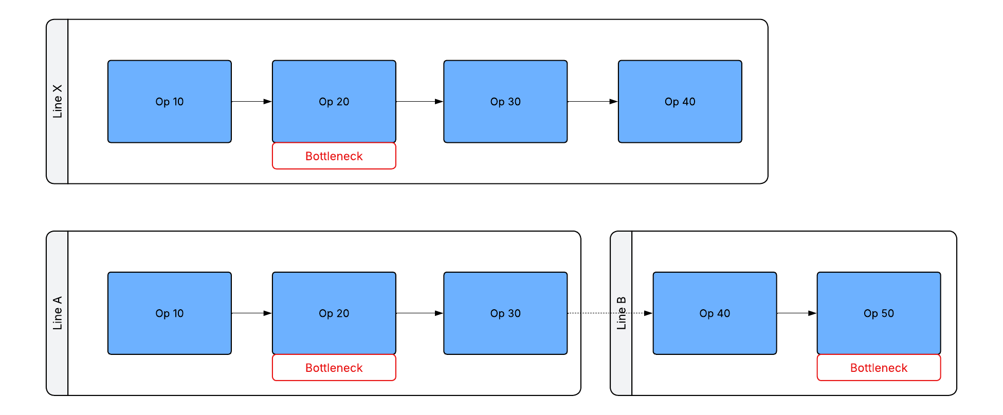
The bottleneck operation in the routing represents a key concept in the application. A stoppage of the machine assigned to this bottleneck operation causes the entire production line to be considered stopped.
The bottleneck operation can be the slowest operation in the routing. In such scenarios, overall line performance efficiency, including OEE, is significantly influenced by the machine performing this operation. Alternatively, the bottleneck operation represents the operation performed by the machine that has the greatest impact on other machines when a stoppage occurs. In tightly coupled processes, a stoppage in the machine leads to rapid stoppages in other machines.
Dashboard data, KPIs, and performance metrics are influenced by operational status of the machine assigned to the bottleneck operation. A discrete routing can include multiple bottleneck operations. During scheduling, the application validates the operations. However, each job is limited to a single bottleneck operation.
The diagrams below illustrate two valid scenarios for defining bottleneck operations:
A bottleneck operation cannot be defined for an operation performed in parallel by multiple machines. This restriction applies when the same routing operation is linked to two or more machines performing the same operation in a single production line for the same production run. For example, the configuration below is considered invalid:
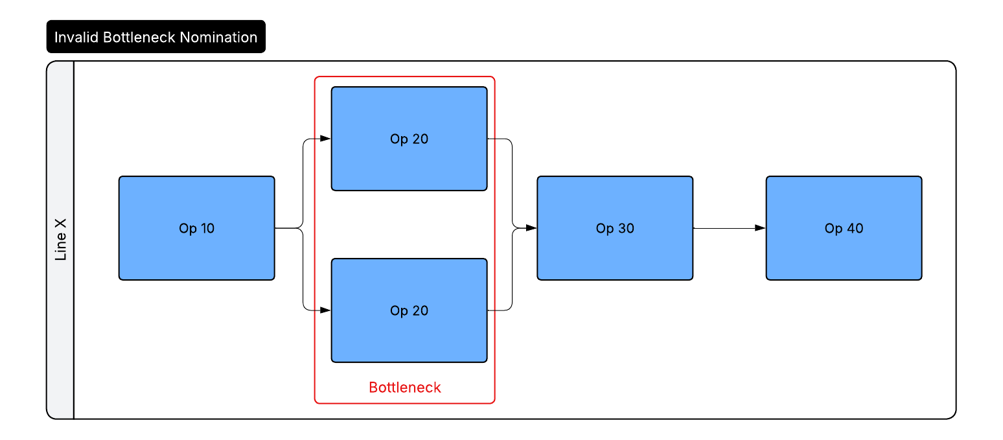
In such scenarios, define the bottleneck operation on the closest unique operation in the routing. These considerations apply:
- The source of downtime can change to match with the selected operation
- If no suitable operation exists, you can add a dummy operation
Routing Operation Code
See .
Operation Inspection Code
Some manufacturing processes have quality inspection definitions or quality specifications that apply only to specific operations or vary between operations within the process.
Defining Operation Inspection Code for the appropriate routing operation along with a matching value on the equivalent field on an Inspection Version (see, Inspection Version) and/or a Specification (see, Specifications) allows the application to:
- Display the Inspection Version only when the matching operation is executed
- Apply the Specification (to determine Specification Limits for measured values) only when the matching operation is executed
This approach is useful in scenarios, such as multi-pass processes, including printing or coating, where quality inspections or specification limits vary between passes and produce the same material.
Phantom Operations
Phantom Operation enables a routing operation to be marked as an operation that is performed by a different production order. This means the operation does not run as part of the production order that references the routing.
The production order that performs the phantom operations must include the same defined operation. This match is based on the associated machine type or machine, if specified. This match helps the application identify and track the operation correctly.
There are two scenarios where phantom operations are required in routings:
- Handling Work-in-Progress Inventory: Inventory items move through operations associated with a single production order, while execution occurs across different lines through separate production runs. These operations involve both consumption and creation of the same material within the production order.
- Scheduling Expected Co-Production Processes: A physical operation is performed once and multiple different materials, represented by different production orders are processed concurrently.
Example processes for these two scenarios are shown below:
Example: Work-in-Progress Routing:

In the above example, a routing linked to a single production order is carried out across three separate production lines. This results in three production runs. However, no material change is required between each stage. Else, three different materials and three separate routings are required. The complexity of this model is important only when Inventory is created during the process.
Example: Co-Production & Recipe Order Routing
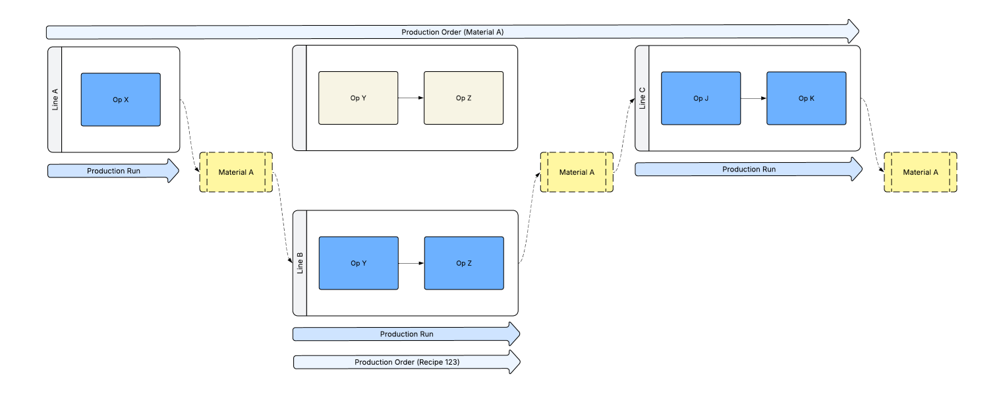
In the above example, routing linked to a single production order runs across three separate lines. This setup creates three production runs. However, two operations are performed on a single production line that runs continuously and processes material from multiple production orders at the same time. Examples of such batch processes include a washing machine, or a heat treatment oven.
The batch or recipe process operation(s) are defined in two routings. The primary routing for the material is created; the other routing represents the batch process. The operation in the primary routing is marked as a phantom to indicate the operation is performed elsewhere.
Optional Operations
Optional Operations are used to represent quality-related inline or offline inspections or activities. These operations are not required under normal conditions, however, can be required when performing rework or other unplanned activities.
The concept of Optional Operations influences the following areas of functionality:
- A production order changes to the complete state if all non-optional operations are completed
- Optional Operations are included in the rework operation drop-down when working with rework processes
- During inventory tracking, an optional operation is never set as the next routing operation when an item of inventory moves out of a process
Target Cycle Time
Target Cycle Time is defined at Routing Operation level. Target Cycle Time defines the number of seconds required to complete an operation for a defined quantity (usually one unit) of material associated with the routing.
Target Cycle Time can be defined for any operation. However, only the value defined on the Bottleneck Operation impacts production scheduling and execution.
The Target Cycle Time Quantity field enables the cycle time to be defined for a different quantity. This is useful when an operation produces multiple pieces in one cycle. For example, if one cycle yields 10 pieces, the quantity can be set to 10.
The Target Cycle Time field can also be used to define production speed instead of time. For example:
- Set the quantity to 60 to represent one minute
- Set the quantity to 3600 to represent one hour
- Define the number of pieces produced in that time
Example: Producing 12 pieces per minute:
You can define this in three ways:
- Using Target Cycle Time:
- Target Cycle Time = 5 seconds
- Target Cycle Time Quantity = 1
- Using 1-minute cycle time, along with the quantity:
- Target Cycle Time = 60 seconds
- Target Cycle Time Quantity = 12
- Using 1-hour cycle time, along with the quantity:
- Target Cycle Time = 3600 seconds
- Target Cycle Time Quantity = 720
Target Fixed Time
Some processes do not depend on cycle time, based on the planned order quantity. Instead, these processes take a fixed amount of time. Examples include, washing machine cycle, drying oven, and batch mixing process.
For such processes, a fixed operation time can be specified instead of a cycle time. The scheduling engine uses the fixed time to calculate the duration of the operation.
To use a fixed time, set the Target Time Based On field to Target Fixed Time, and specify the appropriate value.
Operation Control Flags
In some cases, a specific operation must be identified as the source data for confirmation messages sent to ERP systems.
Control Flags on routing operations help define which operation provides this data or is treated as the relevant reference point. The application uses these flags as part of the standard Infor ERP integration.