Production Campaigns
A campaign is used to group multiple production runs so that they are scheduled and managed together. Production runs in a campaign are locked and scheduled to run one after another. The production runs in a campaign can produce the same or different materials.
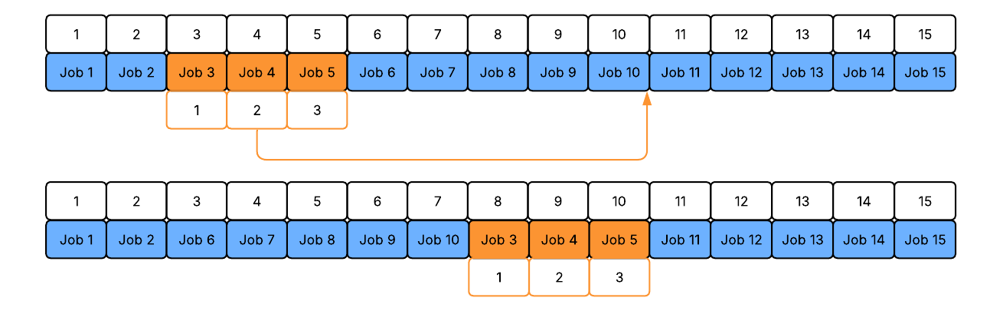
For example, if a production line contains 15 scheduled production runs, locking production runs 3, 4, and 5 creates a campaign:

Each production run in the campaign is assigned to a campaign sequence, which determines the order in which the campaign production runs are scheduled to run. Additionally, each production run on the production line has the schedule sequence that defines the position in the overall production schedule:

Rescheduling production runs in the campaign
Rescheduling a production run in the campaign moves all production runs in the campaign, however, the campaign sequence remains the same. Because campaign production runs are locked together, other production runs cannot be scheduled between production runs that belong to the same campaign.
Changing the sequence of production runs in a campaign
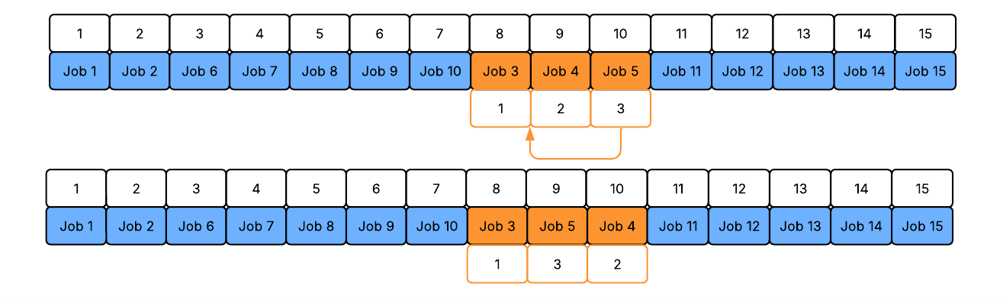
You can change the sequence of production runs within the campaign:
Multiple campaigns
You can schedule multiple campaigns on a line and specify the sequence on the line of each one. For example, Campaigns 1 and 2 can be scheduled sequentially, with Campaign 1 running before Campaign 2.

See Sequences.