Restructure Rental Package Pricing
Background
From a pricing perspective the rental application has two main processes, sales of consumables and renting of rental items and packages. The requirement is to separate the pricing of these processes, including ensuring a single setup of prices for sales items (consumable products) regardless if it is sold through sales order or rental agreement.
For rental items and packages, the pricing set up is consolidated to enable this from a single start point.
In addition, rental package prices are defined in a matrix and added to a price list.
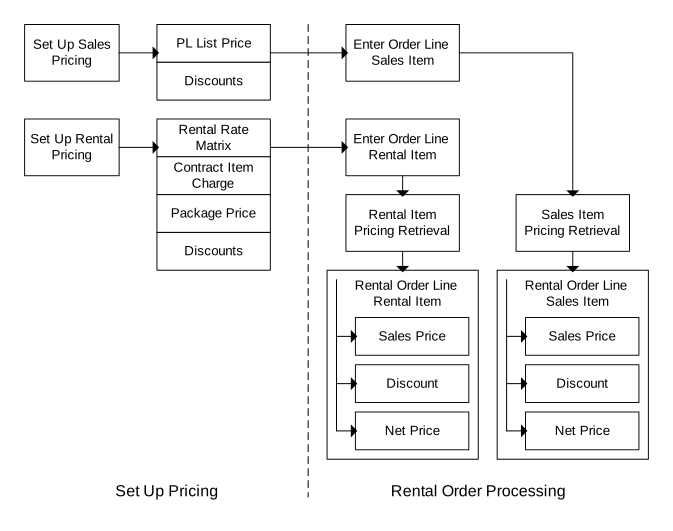
For rental items and rental packages, the requirement is to find the correct price list and price for the right customer and rental agreement, and not retrieve the actual rental price. Based on the control objects for rentals, for example, country, state, customer group, customer site, or reason, M3 must select the correct price list. The main goal is to enable users to define a set of rules that enables M3 to find the correct price list.
Solution
In this figure, the yellow boxes illustrate the retrieval of the rental item pricing.
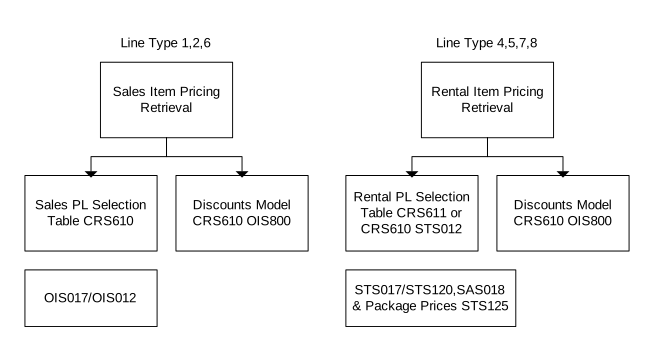
- Customer. Open (CRS610)
- Discount Model. Open (OIS800)
- Rental Price List Table. Open (STS012)
- Customer. Enter Service Order Info (CRS611)
- Discount Model. Open (SOS800)
- Sales Price List. Open (OIS017)
- Sales Price List Table. Open (OIS012)
- Rental Price List. Open (STS017)
- Serv Price List. Enter Rental Rates (STS120)
- Serv Price List. Enter Contract Items (SAS018)
- Rental Rates. Enter Package Price (STS125)
Currently, rental packages are priced using the same programs as used for defining the packages. With the new solution, the package definition is separate from its pricing. Instead, the pricing becomes part of the price list setup.
(STS125) is a new program created for this purpose. It is accessed from program (STS017) by using option 12='Rental Package Rates'.
The current programs 'Rental Package. Open Header' (STS450) and 'Rental Package. Open Line' (STS451) remain unchanged, using tables STPSHE and STPSLI, so that the old rental flow 'Rental Agreement. Open' (STS100) – 'Rental Agreement. Open Lines' (STS101) continues to work. To manage this rental package pricing using tables STPSDH and STPSDL, these programs are created:
- 'Rental Package. Open Header' (STS455) – Header (STPSDH)
- 'Rental Package. Open Line' (STS456) – Lines (STPSDL)
- 'Rental Package. Enter Names/Language' (STS457)
A new table STPSPR (Rental Package Prices) contains the prices for the rental package based on a price list.
The package prices are stored as a matrix of prices in the same way as for rental item prices. The package price is retrieved based on the price list in the same way as normal rental item prices are retrieved to the agreement line.
Limitations
The Restructure Rental Package Pricing is done for equipment using 'Rental Agreement. Open Lines' (STS201) through (STS100). Therefore, programs (STS450) and (STS451), which use tables STPSHE and STPSLI, remain unchanged, so that rental customers using (STS100) to (STS101) can use the old package handling, while equipment customers can use (STS455), (STS456) and (STS457) with tables STPSDH and STPSDL.
Workflow
-
A package is created in (STS455).
-
In STS455, you select option 11 = 'Lines' to access STS456
-
From STS017, you select option 12 = 'Rental Package Rates' to access STS125
-
On STS125/E you set up the rates
STS120 will automatically calculate other field values when a specific field value is entered. For example, when you enter a value in one of the four fields in column 1 (Rate/day), the other fields against that line are calculated. When you press Enter, the calculation is made. The Standard cost %, Delivery charge and Delivery cost fields are optional. If values for them are entered, then they will be distributed down to the package lines in the same way that the retrieved price will be distributed down using the price factors.
Migration Program
Since key fields are removed for this solution no all-encompassing migration programs can be written.
The restructure of the packaging functionality, from STPSHE – Package Header and STPSLI – Package Lines to STPSDH – Package Definition Header and STPSDL – Package Definition Lines, has included the removal of 4 key fields that do not exist in the new solution. These are Division, Warehouse, Currency Code and Customer.
It is possible that packages therefore are set up with any permutation of these fields and Division and Currency were mandatory fields. To do a migration of all the data successfully then would entail a unique package ID being assigned to each and every record that currently appear in the table STPSDH. This is not really practical or possible as an automated process.