Adding Contact Persons to Rental Agreement
This document describes how to create and maintain customer contacts on rental agreements lines.
Rental agreements are often driven by a well-developed relationship between the rental department and the individual contacts at the customer offices. Orders can be connected, searched and emailed to the individual contacts instead of the main customer address.
Overview
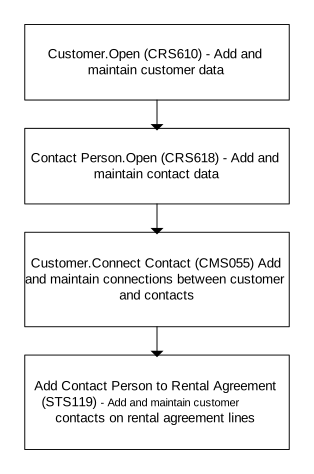
When a rental agreement lines is created from 'Rental Agreeement. Open Lines' (STS201), it automatically connects existing customer contacts that belong to the same customer site (address). You can also select option 44=Connect Contact from (STS201) to manually add contacts in 'Add Contact Person to Rental Agreement' (STS119). In this case, the contacts do not require to be connected to the customer in 'Customer. Connect Contact' (CMS055). The contacts must be defined in 'Contact Person. Open' (CRS618). Related options are available in 'Rental Agreement. Open' (STS100 panel A or B) and program 'Rental Agreement. Create' (STS085).
You can also use the API (STS119MI) with these transactions:
- AddRentalContact
- DltRentalContact
- GetRentalContact
- LstContactsPerAgreements
- LstContactsPerLine
Limitations
This solution automatically connects rental contacts to rental agreement lines.
Before You Start
These programs must be updated.
-
You start by verifying that (CRS618) contains contacts and that 'Customer. Open' (CRS610) contains a customer. Also verify if these are connected in (CMS055). Next, you create your agreement in 'Rental Agreement. Open' (STS100) and add lines in (STS201). When rental agreement lines are created, it will automatically connect existing customer contacts that belongs to the same customer site (address).
- The address type ADRT must be set to '02 - Location address' and address number ADID must be blank to be valid for an agreement header.
- Several contact persons can be connected to the same customer and are automatically added during agreement creation.
- If a contact person is connected to the customer in (CMS055), as described above, the contact person is automatically added during agreement creation and connected to the agreement header. The contact person is visible in (STS119) from (STS100 panel A and B) and through related option in (STS085).
- When agreement lines are added, the contact person on the header is automatically added to the agreement lines.
- If more than one contact person exist for a customer, all contact persons are automatically added to the agreement lines.
- If a specific contact person is connected to a specific address ID, the contact person from the agreement header is automatically added. The contact person connected to the specific address ID is also added.
- Contact person can be added manually in (STS119) for an agreement header. However, if an existing agreement already has agreement lines, those agreement lines are not affected when the contact person is added after the agreement lines are created. Agreement lines that are created after the contact person is added to the agreement header automatically receive the contact person from the agreement header.
- If contact person is manually removed from agreement header, existing agreement lines are not affected. However, future agreement lines do not automatically receive a contact person unless a contact person exists on the agreement header.
Workflow
Access (STS119) to view the contacts that are connected to the agreement line. You can add the contacts automatically or manually.
In (STS119), you can add both new and existing contacts to an existing rental agreement line. To view all rental agreements and rental agreement lines for a selected contact, select F17 in 'Rental Logistics Toolbox. Open' (STS140). (STS119) opens. Use sorting order 3 to view all rental agreements and rental agreement lines for the selected contact.
Follow These Steps
-
Create a customer contact by entering one or more contact persons in (CRS618).
-
Create a customer by entering customers in (CRS610).
-
Connect a contact person to a customer by selecting option 29='Connect contact' in (CRS610). This option starts (CMS055).
-
Connect a contact to a customer.
- In (CMS055), the contact person defined in (CRS618) is connected to the customer defined in (CRS610).
- To create a contact in (STS119), complete these steps:
- Create an agreement in 'Rental Agreement. Open' (STS100).
- Add lines in (STS201).
- After you add the line, (STS119) is updated with information from (CMS055).
- You can manually add new contacts in (STS119).