Rental Insurance and Damage Waiver
Abstract
The rental insurance and damage waiver have these elements of functionality:
- To record insurance information for a customer and for this to include different types of insurance such as Employee Liability, Public Liability, 3rd Party Insurances and Rental Product Specific insurances
- To configure automatic checks regarding insurance level and validity, when a product is rented
- If required, the automatic application of a charge if no insurance or insufficient insurance is in place
Define a customer's insurance at one of these levels:
- Customer level – no rental agreement checks
- Customer / Product Group level – rental agreement line entry checks
The insurance definitions are made from an option, 23='Customer Insurance' or 24='Insurance by Product Grp' against the customer record in 'Customer. Open' (CRS610) – Customer Master.
The Rental Agreement Order Types defines whether Rental Product Specific insurances are checked on a rental agreement. The flag is passed to the agreement header and can be amended there if required. At agreement line entry, the current agreement header value is recorded for any later reference and follow up.
At agreement line entry a check is performed based on the customer/product group of the specified item or serial number if the flag is selected on the agreement header. The check is date-based and replacement-value-based according to the level of cover.
If a check fails at the agreement line entry, the setup determines the actions to take:
- No action
- Warning, auto addition of line charge
- No warning, auto addition of line charge
- Stop, agreement line entry not allowed
Functions created for:
- 'Insurance ID. Open' (CRS681)
- 'Customer Insurance. Open' (CRS682)
- 'Customer Insurance by Product Grp. Open' (CRS683)
Tables defined for:
- Customer Insurance
- Customer Insurance by Product Group
CSYTAB table is used for Insurance ID.
Details about where the replacement value by serial number is held are covered in development item 'RE05 - Serial Number based pricing'.
The replacement value at item level is held at the Item master (MITMAS) level and is introduced by this requirement.
Background
Damage waiver, which is often referred to as collision damage waiver (CDW) or loss damage waiver (LDW), is optional damage coverage that is available when you rent a vehicle. The damage waiver covers the rental vehicle.
When a customer does not pay the vehicle rental company to waive damage, and a rented vehicle is stolen, or damaged by accident, vandalism, or weather conditions such as hail, then the customer or other insurance provider must pay to the rental company the full cost of repair, administrative charges, and, in some cases, loss-of-use charges.
A damage waiver meets the basic definition of insurance, since it transfers some risk from the vehicle renter to the rental company. However rental companies do not call it insurance, since it is a waiver between the renter and the company that the company waives their right to charge the renter for valid damages to the vehicle. Rental companies are not licensed or regulated as insurers. There are also no claims made. Rental companies treat damage waiver as a waiver of their right to make the renter pay for damage to the vehicle.
In the rental industry are the rented vehicles often expensive, so damage waiver is a common part of the rental industry.
Limitations
- Insurance checks are limited to rental agreement lines of line type 5,7, and 8.
- Insurance checks are not cumulative and do not take into account existing or open rental agreement lines.
- Insurance checks are performed only at rental agreement line entry based on the level of insurance for the customer and product group, the validity of the insurance and the replacement value either by serial number, if entered and a value exists, or by item number if not.
- An amendment to an agreement line does not trigger a further check.
- Since the check is performed only at agreement line entry, the 'Product Insurance Check' flag at line level is a display only field. The setting of this flag is determined only by the agreement header flag when the agreement line entry is specified. This serves as an audit trail of what the position is when the agreement line is created.
- General insurance policies are not checked. Only policies that are defined for a customer/product group are checked.
- Customer insurance policies are not managed. If a policy lapses, is not renewed, or is canceled during the period of cover, no messages or warnings are generated.
Workflow
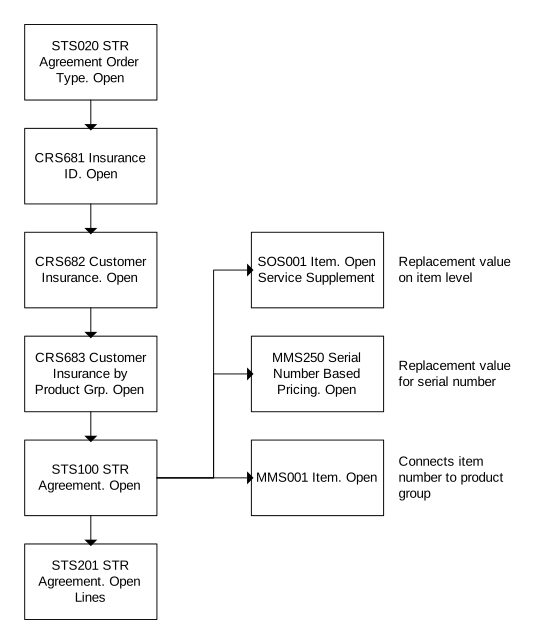
In 'Rental Agreement Type. Open' (STS020), select the check box for 'Product Insurance Check' to activate or deactivate the functionality. When creating an agreement, this flag is passed to the agreement head in 'Rental Agreement. Open' (STS100).
In function (CRS681), add the Insurance ID. In function (CRS682), define the customer insurance and it is called from (CRS610) with option 23='Customer Insurance'.
In function (CRS683), add the customer insurance by product group, which can be accessed both from (CRS610) with option 24='Insurance by Product Grp', from (CRS682) with option 11='Connect prod group', and from the command menu where you specify in the name (CRS683).
Here, you define the connection between customers, product groups, and insurance IDs. You also define the conditions for the damage waiver and the charge to use when required.
The field 'Ins chk basis' indicates the type of insurance check to perform:
0 = No check
1 = Valid from covered
2 = Valid to covered
3 = Valid from/to covered
4 = No check, perform action
The field 'Ins chk actn' indicates the action to perform if the insurance check fails:
0 = No action
1 = Warning, no auto line charge
2 = Warning, auto line charge
3 = No warning, auto line charge
4 = Stop line entry
The replacement value used is held at 2 levels, item level and serial number level. The replacement value on item level is visible in 'Item. Open Service Supplement' (SOS001).
The replacement value for serial number, which is handled by 'RE05 - Serial Number based pricing', is visible in (MMS250).
Flowchart
Follow These Steps
At agreement line entry, perform these checks:
-
Initialize these fields:
- Product insurance check
- Insurance ID
- Insurance check basis
- Insurance check action
-
For line type 5, 7, and 8, check the Rental Agreement Header to see if the 'Product insurance check' flag is set to 1. If the flag is 0, proceed to step 7.
-
If the flag is 1, retrieve the product group for the item or serial number item that you specify. Retrieve the 'Replacement value' from the appropriate table.
-
Verify whether an insurance record exists on (CRS683) for the customer/product group. If a record exists, use that record. If no record exists, verify whether a record exists for the customer or blank product group. If a record exists, use that record. If neither record exists, continue check with customer blank. If no record exists, proceed to step 7.
-
If a record is found at step 4, retrieve the 'Insurance check basis' flag.
- If 0, no further checks are required. Proceed to step 7.
- If 1, verify that the 'Valid from date' (BLFVDT.STAGLI) is within the range of the 'Insurance from date' and 'Insurance to date', and verify that the 'Insured amount' is greater than the 'Replacement value'. If not, proceed to step 6.
- If 2, verify that the 'Valid to date' (BLLVDT.STAGLI) is within the range of the 'Insurance from date' and 'Insurance to date', and verify that the 'Insured amount' is greater than the 'Replacement value'. If not, proceed to step 6.
- If 3, verify that both the 'Valid from date (BLFVDT.STAGLI) and the 'Valid to date' (BLLVDT.STAGLI) are within the range of the 'Insurance from date' and 'Insurance to date', and verify that the 'Insured amount' is greater than the 'Replacement value'. If not, proceed to step 6.
- If 4, then no check is required. Perform the action that the 'Insurance check action' field specifies. Proceed to step 6.
-
If the insurance check basis fails, or is set to 4, apply the 'Insurance check action':
- If 0, no further checks are required. Proceed to step 7.
- If 1, issue a warning message: "Warning: Insurance check for product group 'product group name' failed. Press Enter to continue and take appropriate action."
- If 2, issue a warning message: "Warning: Insurance check for product group 'product group name' failed. Press Enter to continue and line charge will be added automatically." Add the line charge according to the held value to the table STLICH.
- If 3, no message is issued and line charge is added automatically to the table STLICH.
- If 4, issue stop message: "Insurance check for product group 'product group name' failed. Item/serial no cannot be added to agreement."
-
End of insurance check process.
Setup
-
Select the check box 'Prod ins check' in (STS020) to verify valid customer product insurance at agreement line entry.
-
In (CRS681), define the customer ID. This field indicates the identity of the customer insurance or the customer product insurance.
-
In (CRS682), connect the insurance ID to the customer.
-
In (CRS683), connect the product group.
-
In 'Item. Open Service Supplement' (SOS001), define replacement value on item level.
-
In 'Serial Number Based Pricing. Open' (MMS250), define replacement value on serial number.
-
In 'Item. Open' (MMS001), connect item number to product group.