Scheduling using maintenance scheduling board
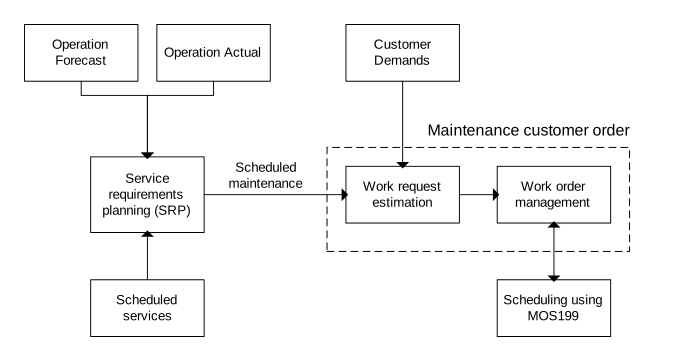
'Maintenance Scheduling Board. Open' (MOS199) is used for the scheduling process. The scheduling process is used to reschedule maintenance work. You can allocate personnel to work order operations. You can also report operation information.
Outcome
Maintenance work orders can be scheduled:
- Work order operations can be moved in time
- Work order operation duration can be changed
- Personnel can be allocated to work order operations
- Material, tools and labor availability can be checked
- Reporting (feedback) of labor, material issues, inspections can be done.
Before you start
- Work orders or work requests with operation element must exist. You can view work orders and work requests in 'Work Schedule. Open Toolbox' (MOS195) or 'Work Request. Open Toolbox' (MOS197).
- Employees must be defined in 'Person. Open' (CRS530) and linked to work centers.
Outline
Follow these steps
- Work order management
Work orders identify work that is due to start shortly or that is already in progress. Work orders are used to report actual information such as time taken, text, and error codes.
From a planning perspective, work orders are not usually as important as work requests because they are due to take place soon and therefore do not offer a great deal of flexibility for replanning. Work orders are usually taken care of in the scheduling process.
- (MOS199)
(MOS199) enables you to reschedule work order operations by time and duration, and provides functionality to allocate operations to employees, check material, labor, and tools availability, and report back time, materials, and inspections.
You can view information in four ways:
- Work center (engineering staff)
- Work center resource (where the work is to be carried out, for example, a bay)
- Schedule number (a group of work orders)
- Employee capability
To view data, you must specify either a 'Department', 'Planning area' or 'Work center'. If you specify 'Department' or 'Planning area', all work centers that are connected to the department or planning area are used. You can specify work centers as a range or as up to three distinct work centers. To use a range, enable the 'From/To' setting on (MOS199/P) by clicking on (MOS199/B).
For sorting orders 1 to 3, specify a 'Start date' and 'Finish date'. If you specify only the start date, the finish date is assumed to be the same date.
For sorting order 4-'Employees with capability', today's date is the default value and cannot be changed.
Within each view or sorting order, you can filter information by these criteria:
Selection fields on the B-panel
- Employee number: Specify up to two different employee numbers.
- Service manager: Specify up to three different service managers.
- Capability: Specify both a capability type and capability.
- Work order status. Specify from and to values. This field does not apply to work requests.
- Assignment status. Specify from and to values. This field does not apply to work requests.
- Reg no/site
- Work order number: This field applies only to sorting order 4.
- Schedule number: This field applies only to sorting order 3.
Selection fields on the Selection panel
On (MOS199/B), click to open (MOS199/P).
- Item: Specify a value if model/site is blank on (MOS199/P).
- Item and serial number: Specify a value if model/site is blank on (MOS199/P).
- Equipment number: Specify a value if model/site is specified on (MOS199/P).
- Position: Specify a value if model/site is specified on (MOS199/P).
- Order type
- Customer number
- Project number and element
- Reference order number and category
Settings panel
- Model/site: Specify a value if equipment number and position are used to filter records.
- Max no records: Limits the number of records that the program reads.
- Maximum no days: Maximum number of days in the date range on the B-panel.
- Days before: Number of days before the start date in the date range that are displayed in the Gantt chart.
- From/To: If activated, the work center fields are used as a range. Otherwise, you can specify up to three separate work centers.
- Dsp closed lines: If activated, work order operations and work request operations with status greater than 89 are displayed. This setting applies only when the sorting order is 1-'Work center'.
- Displ requests: If activated, work requests are displayed.
- Time zone: Specify a time zone if a planner wants to view operations in a different time zone, as though the planner is working in that time zone.
Color coding of the bars indicates the current status:
- Preliminary - grey: Work requests in status 10 or 20, and work order operations in status 10.
On (MOS199/B), click to open (MOS199/P). Enable the 'Dsp requests' setting on (MOS199/P) to show Preliminary - grey bars.
- Ready to start - blue: Work order operations in status 20-50.
- Stopped - red: Work order operations in status 80.
- Final - light blue: Work order operations in status 61-69.
- Started - yellow: Work order operations in status 60-70.
- Finished - green: Work order operations in status 90.
On (MOS199/B), click to open (MOS199/P). Enable the 'Dsp closed Ins' setting on (MOS199/P) to show Finished - green bars.
In a typical scheduling session that uses sorting order 1-'Work center', the scheduler reviews work order operations that are associated with each work center and decides whether the work can be completed in the preallocated time slot. If not, you can move the work in time by clicking the operation once and dragging it to a new time slot. If the duration is incorrect, you can use the same process to move the start time or end time.
When work order operations are created, work order operations are usually assigned to a work center and therefore displayed at the work center level in (MOS199). You can allocate individual engineers to an operation by dragging the operation from the work center level to an individual employee.