Work Order Closure
The purpose of the process is to transfer orders out of the production activity control system. This includes relieving shop floor personnel of responsibility for the orders and providing the system with information to evaluate performance.
The process is finished when the order has been closed and the appropriate actions performed.
Before you start
Before you start the process, the order must be completed on the shop floor with the exception of orders with maintenance objects that are to be scrapped.
Follow these steps
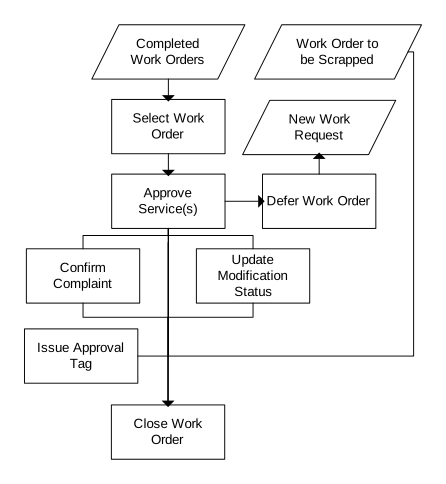
The diagram indicates the activities involved in work order closure.
-
Select Work Orders
'Work Order. Open' (MOS100) is used to select the work orders that have been completed and are ready to be closed. To approve work orders, all operations must be reported (status 90).
-
Approve Services
Orders cannot be closed until all services are approved. Services are approved manually or automatically. Services are set on 'Service. Connect to Facility' (MOS301/E). Manual approval is performed in 'Equipment. Open Service History' (MOS180). For services with automatic approval, the service is approved when the last operation for the order is reported.
In addition to approving the service, warranty information can be specified for both internal work order and external repair orders. Once approved, the status of the service history record is updated to 70-'Approved', the status of the work order is 85, and the status of the maintenance object is updated to 20-'Serviceable'.
After the services are approved, the service meters are updated. The service meters are recorded in 'Serialized Item. Open Service Status' (MMS242). A transaction is created each time the service is performed. The transaction indicates the date on which the service was last performed and the meter value. The meter value is used by the system to calculate when the service must be performed again.
-
Defer Work Order
Despite actions taken to complete orders, it is sometimes necessary to defer a work order. By using option 'Defer work order' in 'Work Order. Open' (MOS100), a new work request is created based on the work order that you want to defer. After deferral, the status is updated to 80-'Deferred' and a work request is generated with status 20.
If the work order is merged and if it consists of several services, defer the services that the work order refers to by selecting option 'Defer service' in (MOS180).
-
Confirm Complaint
If the work order is connected to a complaint, use 'Complaint. Open' (MOS500) to close the complaint.
Update Modification Status
'Serialized Item. Update Modif Status' (MOS184) is displayed when a service is connected to an engineering order. When the modification status is updated, the information is updated in 'Eng Order. Open Component Modif Ref' (MOS212).
When the item number or serial number is changed, 'Balance Identity. Reclassify' (MMS130) is displayed. An automatic check ensures that the combination item - serial number does not already exist before the item is reclassified.
-
Issue Approval Tag
Airworthiness Approval Tags are issued to ensure the airworthiness and eligibility status of parts after manufacture or to release maintenance work carried out on parts or components.
'Approval Tag. Open' (COS210) is used to create and make any changes or additions to an approval tag before it is printed. For each approval tag, you can specify status or work text and include new part or alias numbers.
Print Approval Tag
After all information is registered, print the Approval Tag.
- Core entitlements
If internal orders (blank reference order category) have related core entitlements in the 'Core Entitlement. Open Toolbox (MWS090)', the order cannot be closed until the core entitlements are processed. Processing occurs through completing the core return process, core attrition, or if the entitlement is not applicable anymore through deletion.
-
Close Work Order
Work orders are closed in 'Work Order. Close' (MOS050).
Closing a work order has four different outcomes:
- Close Work Order
In this case, the work order is closed without creating any stock transactions. This outcome is common when a work order refers only to an inspection.
- Scrap Maintenance Object
When a maintenance object is scrapped, two alternatives are available. The object can be completely deleted from the system (scrap code 1), or the object can be scrapped and placed into an obsolete stock (scrap code 2).
- Return to Stock
This outcome returns the maintenance object to stock. The warehouse and location are specified when closing the work order creating a stock transaction. Once the stock transaction is completed, the object is found in the inventory balance for the warehouse.
- Return to Service
The last alternative is that the maintenance object is returned to service and installed in the assembly or aircraft. When an object is installed, a check is performed to ensure that the object has the correct status and can be installed in the object according to 'Position. Connect Components' (MOS450) and 'Model/Site. Open Component Combinations' (MOS460).
After the transaction is completed, the object is included in the next higher assembly, for example, an engine or an aircraft. You can verify this in 'As-Built Structure. Display' (MOS253).
- Close Work Order