Managing Maintenance Customer Order Invoicing
You can invoice jobs and transactions that are handled through maintenance customer orders (MCO).
Use this process to invoice parts or entire jobs, material sales, exchanges, or agreements when meter-based invoicing is used.
Outcome
- An invoice is printed and sent to the customer.
- Relevant information, such as accounting information, is sent to the financial system. The sales ledger is also updated.
- Payment is received from the customer.
- MCO statistics are updated.
For information about updates in M3, refer to the See Also section of this document.
Before You Start
Define an operation plan for invoicing in 'Maint Agrmnt. Open' (COS410) if invoicing is performed on the agreement.
Invoicing for Maintenance Transactions Connected to MCO
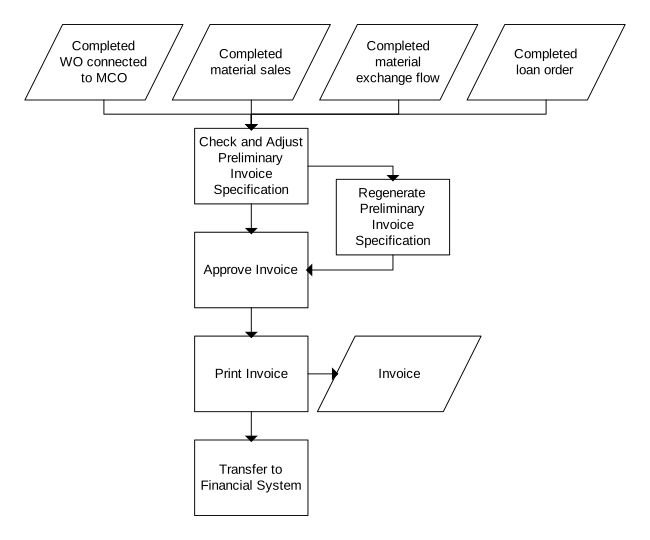
This process variant describes the invoicing flow used for maintenance transactions connected to maintenance customer orders.
-
Check and Adjust Preliminary Invoice Specification
The invoice specification contains the transactions to be invoiced to the customer. These transactions are sorted by transaction type. In this step, you check and adjust existing transactions and add new transactions. You can add travel expenses, change a material price or dates on a loan order.
These activities are performed in 'Maint CO. Check Preliminary Invoice Spec' (COS170).
-
Regenerate Preliminary Invoice Specification
Regenerate the invoice specification, for example, when agreement terms have changed. Such terms may be material pricing methods, price lists, and discounts. Regenerate invoice specifications in (COS170).
-
Approve Invoice
Approve the preliminary invoice specification before you print and send it to the customer. Approve preliminary invoices in 'Maintenance Customer Orders. Open Line' (COS101).
-
Print Invoice
Invoice the order by printing it in 'Maint Invoice. Print' (COS180). When you print the invoice, you make a selection of orders to be included in the invoice run. You also specify whether the invoice run is run.
-
Transfer to Financial System
Manually transfer information to the financial system if you do not select direct transfer in 'Settings - Maintenance CO Invoicing' (COS822). This information is transferred in 'Maint Invoice. Post-process' (COS196).
Invoicing for Meter-Based Agreements
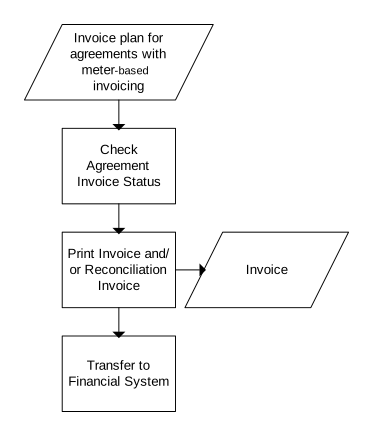
This process variant describes how invoicing is performed for meter-based agreements. Meter-based invoicing means that charges are based on object usage. An object, such as a bus, is connected to the customer's maintenance agreement. Meter prices connected to the agreement define the charge per reported meter unit. The company that handles maintenance for this bus charges the customer based on usage.
In this case, invoicing is performed at regular intervals. You invoice forecasted usage according to the operation plan or actual usage. A common process is to invoice planned or forecasted usage at the beginning of a period. You then perform a reconciliation invoice run when the period ends. This invoice covers any positive or negative discrepancy from the first invoice. A discrepancy can occur when the object covered by the maintenance agreement is used more or less than what is forecasted in the operation plan.
-
Check Agreement Invoice Status
You can check the invoice status of the agreement before you perform the invoice run. This check gives you information about what periods are invoiced and how. For example, a period is invoiced only based on estimated usage and requires updating by invoicing the difference between estimated and actual usage.
Check the agreement invoice status in (COS410).
-
Print Invoice and/or Reconciliation Invoice
Invoice the order by printing it in (COS180). When you print the invoice, you specify what agreement to invoice and make a selection of periods to include in the invoice run. You also specify whether the invoice run is run.
-
Transfer to Financial System
Manually transfer information to the financial system if you do not select direct transfer in (COS822). This information is transferred in (COS196).
Closing MCO lines Connected to Meter-Based Maintenance Agreements
This process variant describes how to close MCO lines that are connected to meter-based maintenance agreements. This process is performed at regular interval, for example, once a day, or once a week.
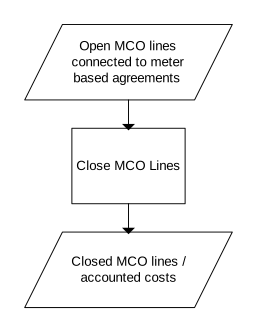
You can close the MCO lines that are connected to meter-based maintenance agreements in (COS180).
Invoicing in Advance
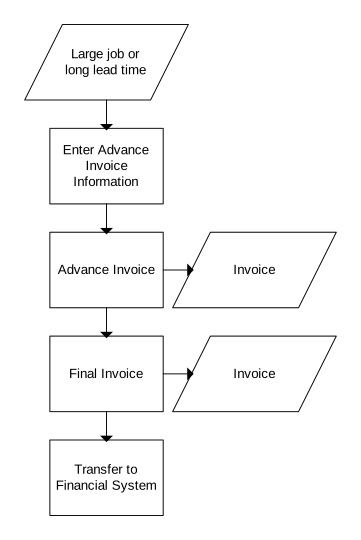
This process variant describes how invoicing is performed in advance. You invoice in advance when the customer must pay before delivery. Typical reasons for applying this method include transactions involving large amounts or long delivery schedules.
The total amount is not normally invoiced in advance since it is difficult to know what a large job finally costs. Final invoicing is performed when the last delivery is completed.
- Define an advance invoice item in (COS822) to present advance invoice amounts as item lines in the invoice BOD. The advance invoice item is represented by a customs statistics number set up in 'Customs Statistics Number. Open' (CRS128).
- Complete these steps to enable advance amounts to be offset as credit notes:
- Define '520 FAM function - credit note' (CRFF) and '510 Accounting option - credit note' (CRAO) in 'Settings - Accounts Receivable' (ARS905).
- Set 'Deduct method' to 1-'Offset as credit note' in (COS822).
- Optionally, specify 'CN no. ser' in (COS822) if the regular advance invoice number series is not used for the credit note.
-
Specify Advance Invoice Information
Specify information about the advance invoice in 'Maint CO. Invoice in Advance' (COS102). Specify the advance invoice date and the sum to invoice.
-
Advance Invoice
Print the advance invoice in (COS180) as a regular invoice. The difference between invoicing an advance invoice and a regular invoice is marking the invoices differently.
-
Final Invoice
Print the final order invoice after the last delivery on the order is completed. This invoice is automatically reconciled against the advance invoices. Print the final invoice in (COS180).
If 'Deduct method' is set to 1-'Offset as credit note' in (COS822), the advance amount is offset as a credit note that is created in conjunction with the invoice. These are represented by a credit record created in (COS102). The invoice is the full amount without deduction of the advance amount. The credit note populates the invoice BOD tables with 'Information type' (IVTP) of 02-'Credit note'. The final invoice number is sent as 'Reference - extended invoice number' (RXIN).
The credit note must be manually transferred to FIM through (COS196). It is only included in the transfer if the invoice that triggers its creation is successfully transferred to FIM. Once transferred, the credit note is automatically deducted from the invoice in accounts receivable.
-
Transfer to Financial System
Manually transfer information to the financial system if you do not select direct transfer in (COS822). This information is transferred in (COS196).
Partial Invoicing
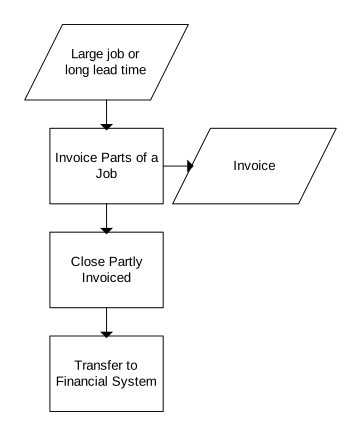
This process variant describes how partial invoicing is performed. Use this variant to invoice an order on multiple occasions over a period of time. When you partially invoice an order, all transactions that are reported and are included on the invoice specification are invoiced. The next time you invoice, all new transactions since the last invoice are invoiced.
-
Invoice Parts of a Job
Perform partial invoicing to invoice all reported transactions to date. The next time you invoice, all transactions since the last invoice are included. Print the invoice in (COS180).
-
Close Partially Invoiced Jobs
Perform this activity to manually close partially invoiced customer order lines. This is performed in (COS101).
-
Transfer to Financial System
Manually transfer information to the financial system if you do not select direct transfer in (COS822). This information is transferred in (COS196).