Migrating classic on-premises to MT setup
Migration overview
The primary goal of this migration is to improve maintenance and increase quality by combining the MT and classic OP versions under a single codebase.
When organizations transition from a classic OP setup to an MT setup, they gain access to new MT-exclusive features, performance, functional improvements, and process maturity for higher quality. The result is a more unified, scalable, and maintainable system that supports future enhancements with efficiency.
M3 DMP Client
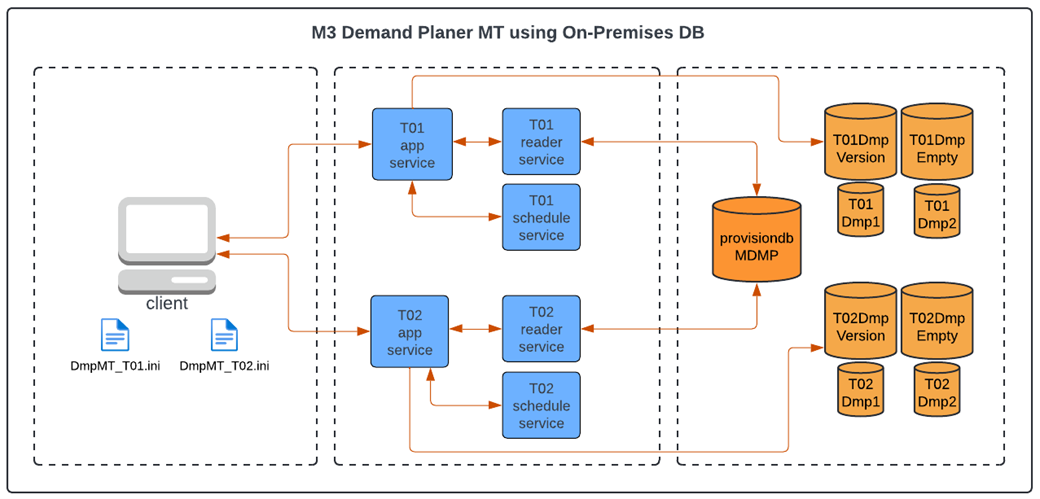
The M3 DMP Client connects to tenant-specific M3 DMP MT services by using configuration defined in DmpMT.ini files. Each configuration file like DmpMT_T01.ini and DmpMT_T02.ini represents a tenant setup and enables support for multiple tenants within the same environment. The M3 DMP Client connects to classic OP and new MT services.
This diagram shows the layout of the new MT setup for M3 DMP:
M3 DMP MT Services
The migration process introduces a set of M3DMP MT services specifically designed for a multi-tenant architecture. Each tenant has a dedicated deployment of these services.
This table shows the standard M3DMP MT service group, which includes these components:
| Component | Description |
|---|---|
| M3 DMP Application Service | Acts as the counterpart of the classic on-premises DMP Server. This contains the core back-end functionality and handles main application logic. |
| M3 DMP Reader Service | Retrieves tenant-specific information from the provision database (provisiondbMDMP). This serves as a gateway and provides the connection details required for the client to communicate with the appropriate tenant database. This service can read only the provision information to ensure security by design and reduce responsibility within the code. |
| M3 DMP Schedule Service | Performs automated tasks based on user-defined schedules. Supported operations include Import and Export M3 Datasets, Import and Export Datalake, and RunSQL actions. |
M3 DMP migrated database structure
This migration applies exclusively to systems that connect to SQL Server databases. The migrated OP database retains a structure aligned with the existing setup, with minor adjustments to ensure compatibility in the MT environment. Migration applies to existing OP installations that follow the OP database design, which includes Version and Empty databases (T01DmpVersion and T01DmpEmpty) and tenant-specific DMP data (T01Dmp1 and T01Dmp2).
The new M3 DMP MT services can coexist with the classic OP DMP service after the database is migrated.
For new database installations, you must use the M3DMP SQL MT Installer directly, rather than using the classic OP SQL database setup followed by migration.
The provision database centrally manages tenant metadata and configuration details.