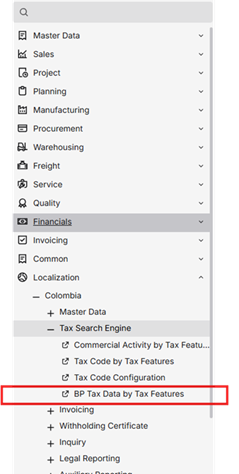
Business Partner Fiscal Data Search
- By relationship between business partner and addresses
At the invoice composing step the ship to address is used to define search parameters. This is used because Addresses have a higher granularity than a simple location definition. This way the user can maintain relationships between business partners and searches directly.
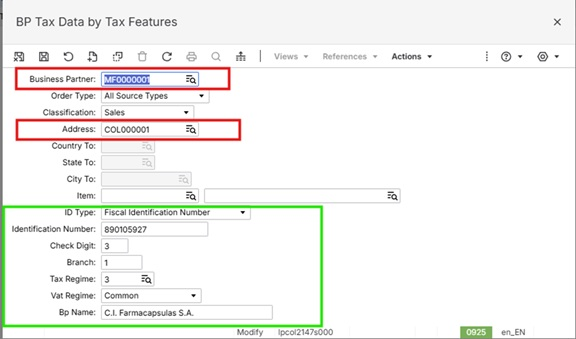
In picture above, it shows relationship between Business Partner and Address in red. In green it’s the data that will be retrieved, to be persisted on Withholdings tables.
- By search rules using data shown below
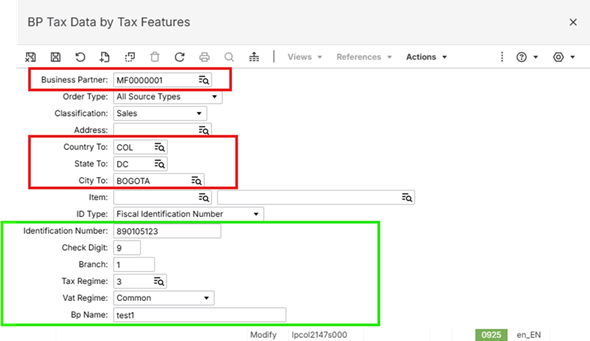
In picture above, it’s shown a way to define search rules for the data highlighted in green.
Please note that this is a search rule, which means that this can be used to define retrieval data for all Business Partners (having this field as empty), for specific Items and/or for different Order Types.
The data is retrieved from the functionality in this sequence:
- Step one: It would be searched the relationship between business partner and the address
- Step two: It would be searched using rules
- Step three: If no record is found in both ways the normal BP localized record you will be used for retrieving the information needed.
To define search rules, user can access the specific sessions using this menu (Localization>Colombia>Master Data>Tax Search Engine>BP Tax Data by Tax Features):