Phantom operation inheritance for Manufacturing
Phantom operation inheritance in a multilevel BOM structure
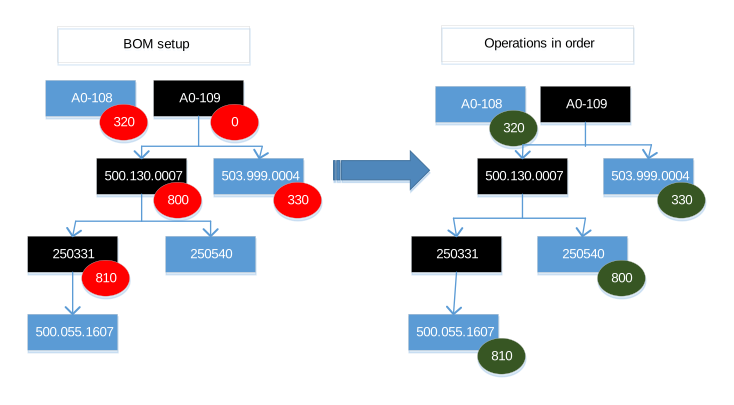
Example: The image shows a multilevel BOM structure that includes several phantom components. The top-level item contains two components, A0-108 and A0-109. Component A0-109 is a phantom item that is used as a module and in this case does not have own operations. This phantom item contains another phantom component, and the structure continues across multiple BOM levels.
In this scenario, you can link the phantom component 250331 to operation 810 instead of linking each individual material within the phantom structure to the same operation. Because the phantom component 250331 does not have its own routing, the inherited operation is used. As a result, all material lines linked to this phantom component which have operation set to 0, including material lines in lower-level phantoms, inherit operation 810. If the item 500.055.1607 is linked to operation 820, this operation is used and does not inherit the operation from the phantom parent.
This process ensures that the material requirements for the phantom structure are planned and issued against the correct operation without manually assigning the operation to each lower-level material line.
Production order
When a production order is created, the BOM is retrieved and the operation is determined for each material line. If the Inherit Phantom Operation check box is selected in the Production Settings by Site (timfc0180m000) session, the checks the parent levels in the BOM structure for a matching routing operation and, if required, passes that operation to the lower phantom levels. This is done as long as the parent phantom doesn’t have its own routing.
If the material line is linked to a phantom item that has own routing, the application first checks the phantom parent routing for the operation. If no matching operation is found, the application uses the first operation in the phantom route.