Infor LN user in a client-server environmentThe client/server architecture as supported by Infor LN enables the Infor LN user to work with several database types. One or more systems can distribute these databases. A remote database configuration is one on which an application server (Virtual Machine) and the database are not on the same system. If the Infor LN database driver is run on the remote database server, Infor LN users can only access the RDBMS by a remote user account. In a client/server environment, the Master Application Server (MAS), which stores the run-time data dictionary, can be located on the remote system. In that case, the Infor LN user must have a remote user account to retrieve software components from the MAS. Possible reasons to set up a remote database configuration include the following:
The database tables can be located in various ways in a remote database configuration. For example, a part of the tables can be located on the local system and another part of the table can be is located on a remote system. The following figure shows an example of a remote database
configuration: 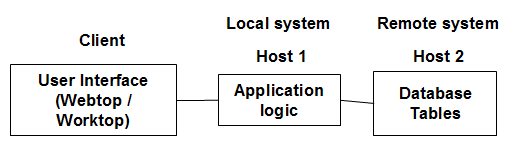 Example of a remote database configuration In this figure, the application logic (Virtual Machine) is installed on the local host, while the database resides on a remote system. To be able to work with distributed or remote databases, the Infor LN users that are logged in to the local system must be able to connect to the database on the remote system. The two possible scenarios are the following:
| |||