Configuring error handling and the error connector in Infor Process Designer
You can configure error handling for activity nodes in Infor Process Designer.
There are error connector that is available with Infor Process Designer that enables you to build error handling into the activity node and eliminates the need for a Branch activity node for the purpose of error handling. In previous releases of Infor Process Designer and with Infor ProfessFlow Designer, most activity nodes required you to use the Branch node to include error handling.
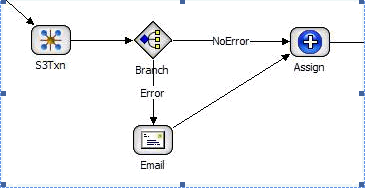
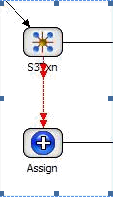
The User Action and HRTM User Action nodes have the ability to configure error handling built into the node. You do not need to use the error connector with these nodes.
To use the error handler connector with these activity nodes, you can do so. For each of these nodes, an On Error tab appears on the Properties pane.
| Activity node type | Node |
|---|---|
| Common | |
| Work Object | |
| Control | Custom Activity |
| System Command | |
| Data | Data Iterator |
| Data Transformation | |
| Decrypt | |
| Encrypt | |
| File Access | |
| IDM | |
| SQL Query | |
| SQL Transaction | |
| Infor Lawson | Landmark Transaction |
| Adapter | |
| Query | |
| Transaction | |
| Queue | JMS |
| WebSphere MQ | |
| M3 | Event Hub Publisher |
| Transaction | |
| Web/XML/JSON | Web Run |
| Web Service | |
| XML |