Multi-threading for exporting large CSV files configuration
System administrators familiar with multi-threading can configure the settings described here. If an administrative user has permission to set up multi‑threading for exporting large CSV files, the configuration is done from the Advanced tab of the Export to CSV action.
Multi-thread export enablement to CSV configurable feature for a user role
The Advanced tab displays on the Export to CSV actions for users who been assigned a role that has the configurable feature. This feature is on the Data column of the Configurable Features page.
Multi-threading for exporting large CSV files configuration
Multi-threading is a type of record processing that enables large files to be processed more efficiently than usual. This is because records in each thread, or group, are processed simultaneoulsy.
The downside of multi-threading is that records are not sorted in the export file even if they had been sorted in the application database. You can use a tool like Excel to sort the records after they have been exported.
Configuration for exporting a CSV file through multi-threading is performed on the Advanced tab. 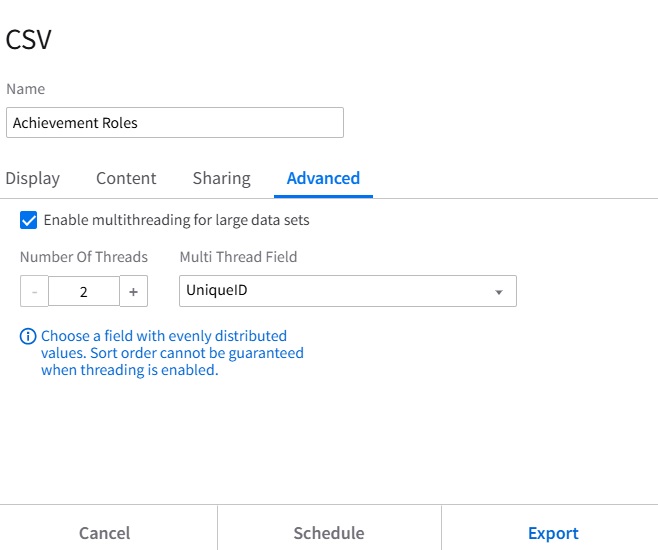
Based on the list you have selected for exporting, Landmark suggests a field to use as the Multi-Thread field and a number of threads.
- The list, Achivement Roles, is selected for export.
- Unique ID is the report field suggested by Landmark to be the Multi-Thread field. If more than one field is suggested, it becomes available from a drop-down list. You are not required to select one of the suggested fields. You can search for and any field from the list.
- 2 is the number of threads Landmark has suggested in this example. You can increase the number.