Configuring complex schedules examples
These are some complex job or action scheduling examples.
Example: Once or more per Week schedule type running on multiple days
The screen capture shows an example of a schedule that runs on the second Sunday of the month at 3:00, 6:00, 9:00 AM and 12:00 noon.
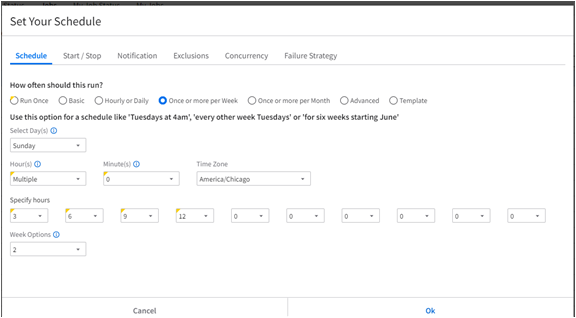
This is how the configuration was achieved:
- Schedule type: is selected.
- Select Day(s): is selected.
- Hour(s) field: indicates that the action should run multiple times.
- Minutes field: is selected, indicating that the schedule starts at the beginning of the selected hours, 3:00, not 3:01.
- Specify Hours fields: 3, 6, 9, 12
- Week Options: is selected.
Example: Once or more per Month schedule type running on a range of days and hours
The screen capture shows an example of a schedule that runs every month for the entire day from the first to the 15th of month.
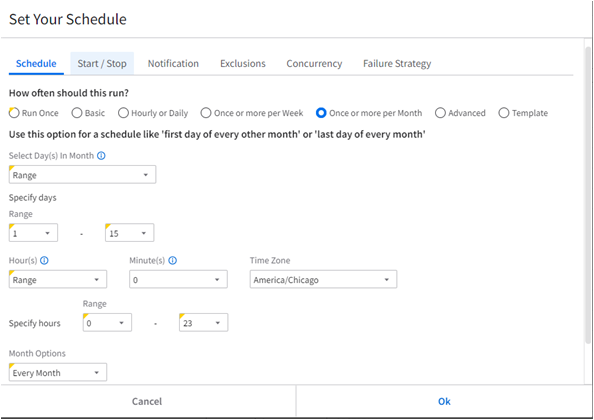
This is how to achieve the configuration:
- How often should this run: Select .
- Select Day(s) in Month: indicates that the action should run over a range of days.
- Specify days: Select .
- Range: 1 to 15 indicates that action runs for the first 15 days of the month.
- Hours field: Select .
- Range: 0 to 23 indicates that action runs for the entire day on the selected days.
- Month Options: Every Month is selected.