Creating a custom java trigger API for Infor Process Automation
You can create a custom API to trigger a process.
These are the main classes of the API:
-
LPSSession
-
ProcessRequest
-
ProcessResponse
System prerequisites
To build and run a Java program that uses the API, you must add these Lawson jar files to the classpath. If you plan to run these APIs on any machine other than the Lawson server, copy these files to that machine.
LAENVDIR/java/thirdParty/sec-client.jar
LAENVDIR/java/jar/bpm-interfaces.jar
LAENVDIR/java/jar/type.jar
LAENVDIR/java/jar/security.jar
LAENVDIR/java/jar/clientsecurity.jar
LAENVDIR/java/thirdParty/grid-client.jar
LAENVDIR/java/Lawutil_logging.jar
Starting and ending a session (LPSSession)
The LPSSession object keeps track of the communication session with the Infor Process Automation Server. A session object is created using the factory method createGridSession, passing the grid host, grid port, SSO user, SSO password, and Infor Process Automation data area. This call starts the session:
LPSSession session = LPSSession.createGridSession(
                    gridHost, gridPort, user, password, pfiDataArea);
When you are finished making calls to Infor Process Automation, use this call to end the session.
session.close();Making requests
To make a request, a ProcessRequest object is created first:
ProcessRequest request = new ProcessRequest();
The next call sets properties. You can set the service name or the process name. If you set the service name, the processes run is determined based on the service setup.
If you specify the flow name, the flow specified will be run:
request.setFlowName("myFlow");When the request object is set up, a method of the LPSSession object is used to send the request to Infor Process Automation:
ProcessResponse response = session.runRequest(request, true);The program should look at the results from running the flow, which are contained in the returned ProcessFlowResponse object. The runRequest method is used to make synchronous requests.
This is the main method for making an asynchronous request:
createAndReleaseWorkunit: ProcessFlowResponse response = session.createAndReleaseWorkunit(request);Simple example
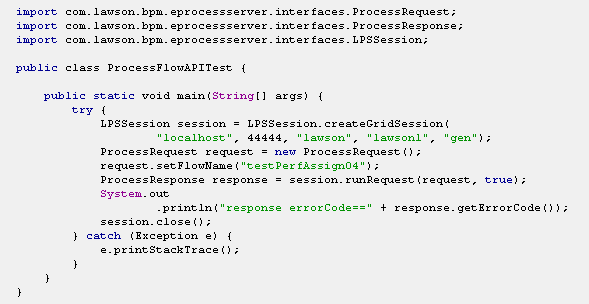
This is an example of simple Java program to run a process synchronously.