Example of building an XML
If building your XML requires iterating over a set of data to create multiple parent and child elements, we recommend to have an XML variable declared in the Start node that acts as the root element for the file. When using the XML node to build the body of this file, you have to append each element to the variable. When the process is done iterating over the data, the entire XML is written out to a file.
This is an example of building an XML file:
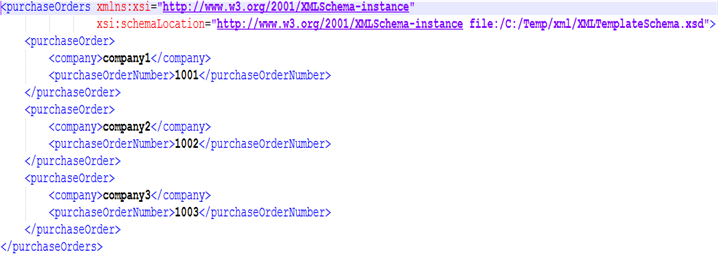
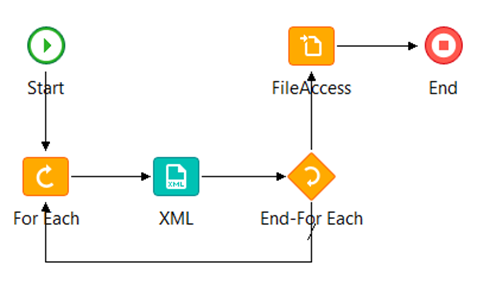
- In the Start node, declare an array of companies and an array of purchase order numbers that populates the XML file. This process flow is used for building the XML file:
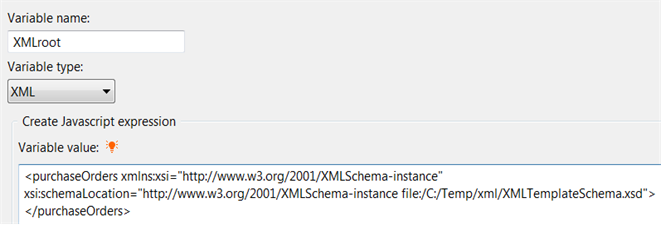
- In addition to the data arrays declared in the Start node, declare an XML variable that defines the element name and appropriate schema information to serve as the root element of the XML file.
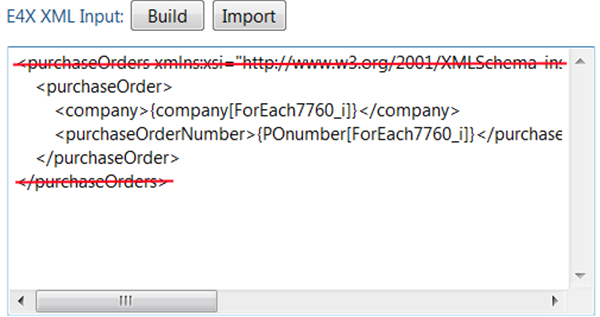
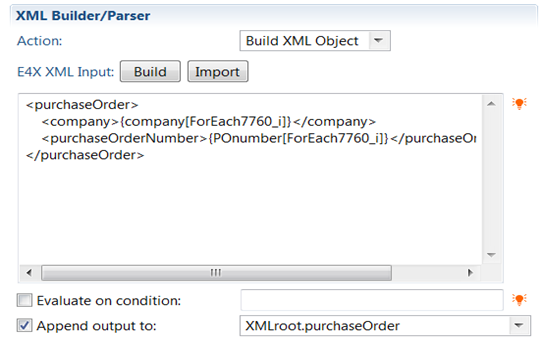
- If you use the build wizard, the root element and the schema information are automatically added to the E4X XML Input box of the XML node that builds the body of the file. Remove the root element and schema as illustrated in this example:
- Select Append output to field. In the field next to it, specify the name of your XML variable, and add the name of the element that the information is appended to. For this sample scenario, the XML variable is purchaseOrder.
When the process is done iterating through your data, the entire XML file is found in the variable you defined in the Start node.