Language
The language that is used to display text in the application depends on the language settings of your browser. You can change this language by changing your browser's language. Your preferred language is at the top of the list. Refer to your browser's online help for instructions.
These languages are supported:
- English
- Spanish
- French
- Chinese - simplified
- Turkish
- German
- Italian
For some fields, you can provide translation of input data. These fields are marked with a symbol on the text box. You can also update existing translations in these fields.
This image shows the symbol that is available on the text boxes where you can provide user-defined translations:
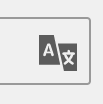
When translation is available, the translated text is displayed on the application based on this order:
- Language of your browser
- English
- Base language of the application
If no translations are available, the original field value is displayed even if the selected browser language is different from the language of the initial value.
Arabic and Montenegrin are supported for data translations.
To enable user-defined translations for languages that are not officially supported, you must activate the generic lookup for that language.
See the information on activating a language generic lookup in the Infor PLM for Fashion User Guide.