Recording par location cycle counts
Use this procedure to record cycle counts with the handheld terminal. You can scan or record items, locations, bins, and companies.
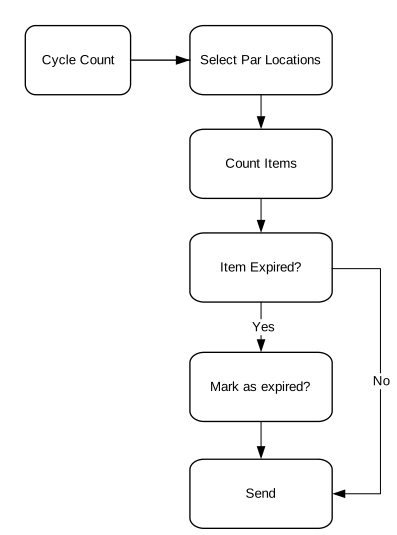
- From the main menu, tap Cycle Count. The Download Count Forms screen is displayed.
- Tap the Action menu (ellipsis) > Par Location Count. The Par Cycle Count Download count Forms screen is displayed.
Note: A warning is displayed if you have made selections in the par cycle count for one company and then change to another company. You cannot count par cycle count forms for multiple companies.
- Select the check boxes next to the forms you want to count and tap Download.
The handheld application downloads the count forms you selected. The Ready to Count screen is displayed.
- Select the par cycle count row to count in the list and tap Count.
The Par Location Cycle Counting screen is displayed.
The PPE label is displayed to indicate if the item is identified as a PPE item.Note: If an item is created in FSM and tagged as PPE, the PPE label is Yes. If not tagged as PPE, the PPE label is No. - In the Count field, specify the count. Expired item count can be specified separate from non expired items.
Note: To go to a specific item that you want to count, scan the bar code label for the item. Par Level UOM is displayed if it is used in creating the count form.
- Tap the Next to specify the par cycle count for the item and to move to the next item.
You can also scan an Item or Bin label when navigating through the list.
- Tap Done when finished with the current cycle count form.
Tap List to view all counts for the current cycle count form.
The Ready to Count page is displayed.
- Continue counting the par cycle count items for the remaining count forms using the same steps.
- Tap Send to send the completed par cycle counts to the main server.
When the system displays a message that the par cycle counts have been sent, the message will disappear.
- If you are finished counting the par cycle count forms, tap Exit.
To continue counting the remaining count forms, go to step 4.