User provisioning
User provisioning is the process by which users are added to the system. All customers who run HR Talent under Infor OS can add new users through the HR Talent administration menus. You can access user provisioning in .
We recommend that customers use this method, including Infor Financials & Supply Management customers who use the HR Talent application only to add employee records. HR Talent simplifies some aspects of adding new users through its automated processes. Automation for adding new employees to CloudSuite HCM is provided in Infor HR Talent. You must use the automation when provisioning new users to the system. Users and employees are used when referring user provisioning in HR Talent.
If you are provisioning users for the first time on the multi-tenant cloud for HR Talent, you must follow additional procedures.
User provisioning configuration in Infor HR Talent
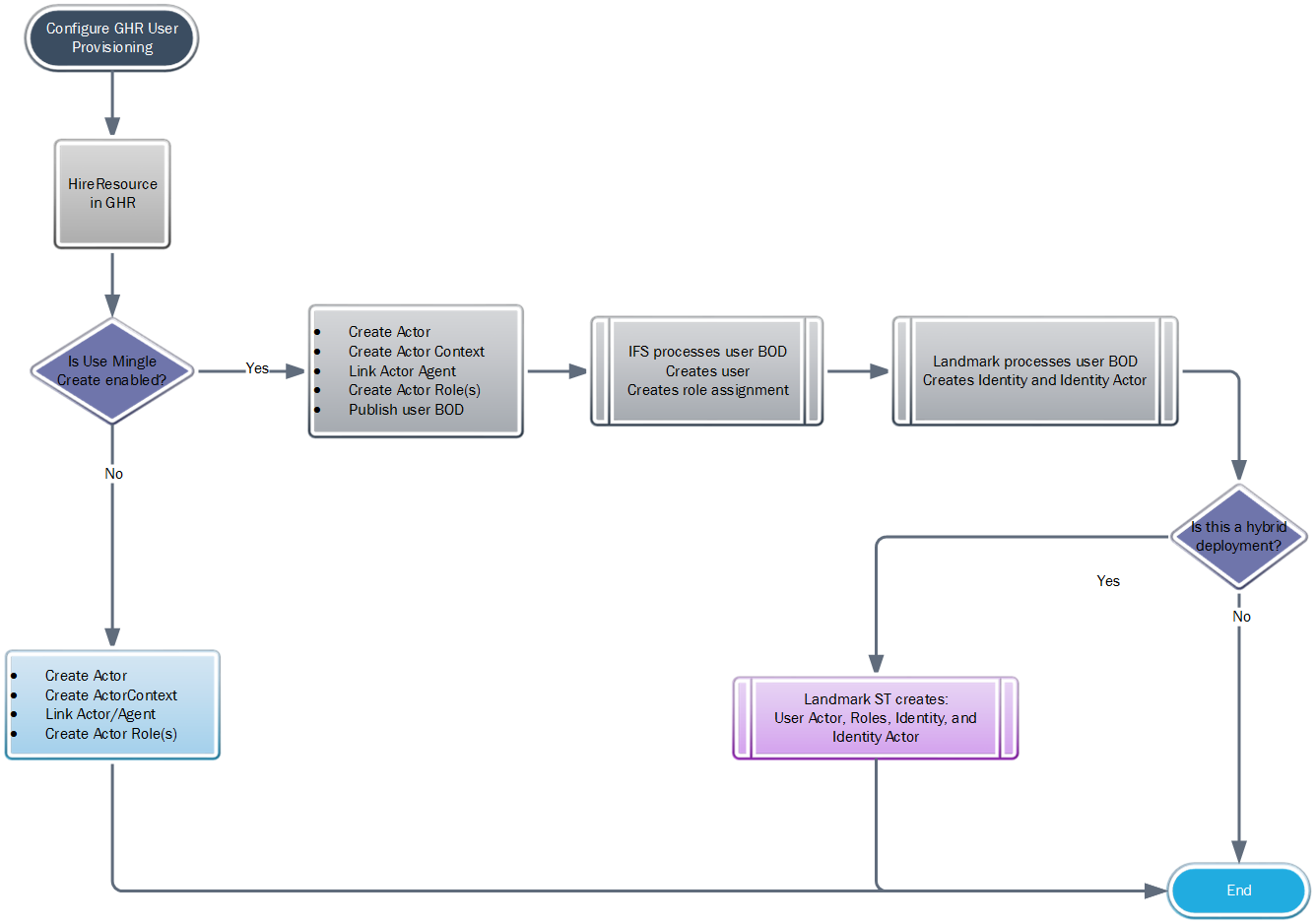
During a hire, you can create the employee’s actor. The associated roles, agent, and actor context are created simultaneously.
The actor roles are created for the user based on Hire and Position parameters.
The process used to configure user provisioning varies by deployment type.
Data privacy conventions
The European Union has adopted data privacy standards, described by the General Data Protection Regulation, or GDPR. The GDPR unifies requirements for data protection for all individuals within the European Union.
If you are required to be GDPR-compliant, do not use an Actor ID scheme that provides identifying information, such as first name and last name. Use the privacy conventions that have been established at your site.
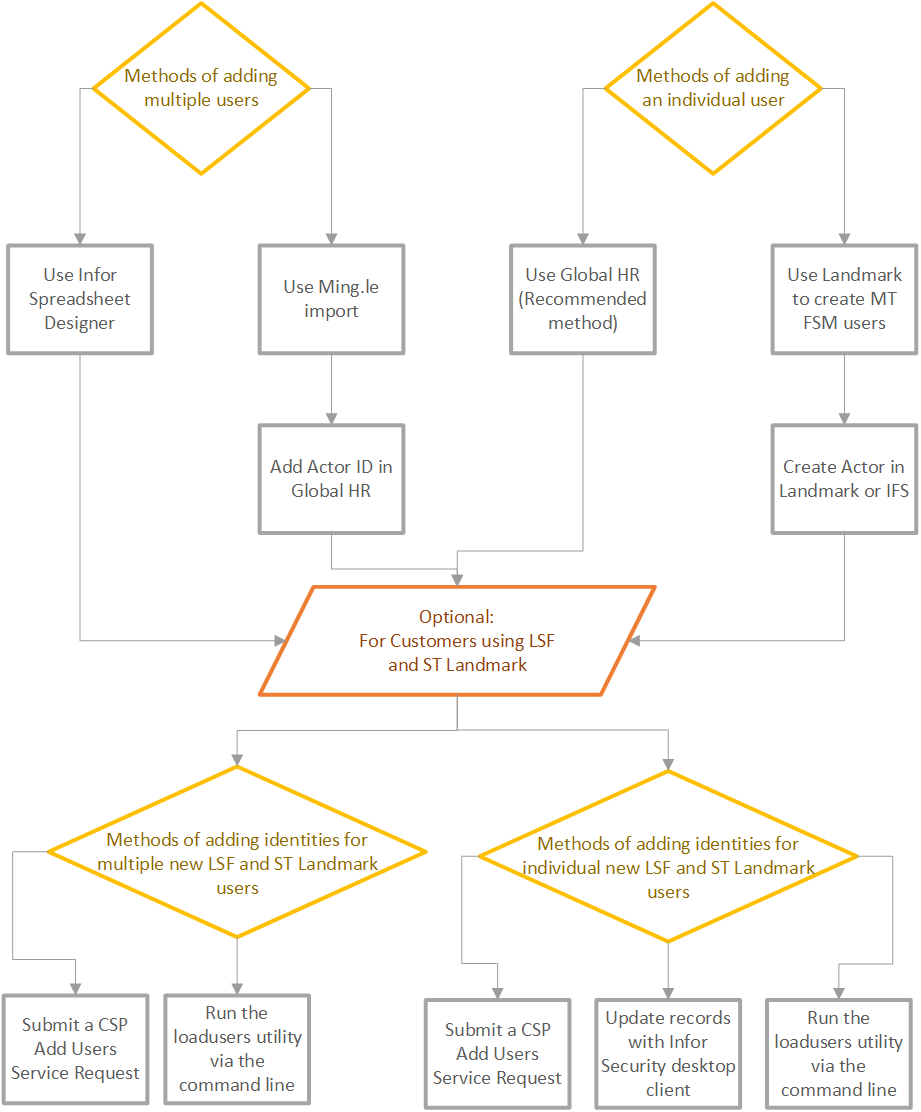
Best practices for adding users and employees
Use this flowchart to determine the best method to add your users or employees.
Resources
A resource is a person who has a relationship with the organization. You create the resource relationships when you set up your organization, and then assign those relationships to resources as they are added.
- Employees
- Volunteers
- Contractors
- Seasonal workers
- Retirees
- External recruiters
- External instructors
- Whether employment IDs are assigned
- The start employment ID
- Whether duplicate personal identification numbers (PINs) are allowed
PINs are different from the employment IDs.
CSV import file details
Import files in .csv and .xml formats are accepted inInfor OS.
A header is required for these files. The required variables in the header are displayed in bold. Next to the header names are examples of what the column should contain. You can use other variables can if your installation requires them.
You must provide the first and last names in the header.
These details are included in the import file:
- FirstName
- LastName
- EmailId
This detail is required in the header. The format is Jane.Doe@company.com. If corrections are required, you can update the Email IDfield through Infor OS User Management. When you update the Email ID field, the user name is automatically updated.
- User Name
The format is Jane.Doe@company.com
- GenericProperty_ActorID:
The format is first name.last name.
- SecurityRole1, SecurityRole2, SecurityRole3,...SecurityRoleN
The names of user's roles, delimited by commas
Import of employees in Infor HR Talent
When you mass-load employees in HR Talent, you must accomplish these tasks:
- Create a data load file in the correct format
- Load the data into a staging table
- Load the staged data in HR Talent
Single-tenant LSF additions for new employee or user records
Customers who use a single-tenant HR Talent and plan to use a Hire action in HR Talent to add employees or users must manually add the required Infor Lawson System Foundation attributes and service identities for the user.
| Service or attribute name | Required for |
|---|---|
| Productline | All Infor Lawson System Foundation users must have this attribute. This attribute is LSAPPS. |
| Employee | All Infor HR Management users must have an identity on the Infor Employee Self-Service. |
| thickclientldapls | All Infor Lawson System Foundation users who run desktop tools must have an identity on the thickclientldapls service. This includes users who access on the single-tenant system and those who make calls to the Infor Lawson System Foundation services Data (DME) or Transaction (AGS). Before the identities can be updated, these users must have an INFORBC account which can only be created through CloudSuite Portal. |
| lsenv | Admin users who require access to LID or any user who will run batch jobs must have an identity on the lsenv service. Before you can update the identities, these users must have an INFORBC account which is created through the Cloudsuite Portal. |
| Group | If you use LSF groups at your site, the user record must be updated with the attributes for all groups the user must belong to. |
Submission of add users request to load identities
In the CloudSuite Portal (CSSP), create and submit an Add Users Service Request for users who need Infor Lawson System Foundation user attribute updates. Use this method to mass-load identities for users.
CloudSuite Portal is the only method to create an INFORBC account required for users who need an lsenv or thickclientldapls identity.
Populate the spreadsheet that accompanies the Add Users Service Request with the ProductLine attribute and the Employee service identity required for all users. Add other required attributes or identities.
- thickclientldapls service (desktop tools access)
- lsenv service (command line access and batch jobs)
- Groups
If you use Infor Lawson System Foundation groups, include the group names that the user must access in the spreadsheet.
- Username must match Actor
- The email address must match the value stored in Infor OS
- The thickclientldapls identity must use UPN format (username@inforbc.com)
An INFORBC account must exist before you add the identity. When you use CloudSuite Portal to update an identity, set the AdLevel field to Yes. CloudSuite Portal first adds the INFORBC account and then adds the identities.
- The system adds the lsenv identity automatically for all records with AdLevel and LSFLevel fields set to Yes in the CloudSuite Portal input file
The CloudSuite Portal Add Users spreadsheet does not have a column to add the lsenv identity.
To access instructions for completing an Add Users Service Request, click the button.
Updates in user records through the Infor Security desktop tool
After a user is added to the Infor Lawson System Foundationsystem through a user BOD, you can use Security Administrator (LSA), an Infor Security tool. Use this tool to manually update the user's record. This method can add several records that do not require an lsenv identity or a thickclientdapls identity. Because INFORBC accounts must exist before you can update these identities, we recommend that you use CSP to add these identities.
See the Infor Lawson System Foundation Online Documentation for CloudSuite and select .
Professional services
The loadusers command-line tool is another way to update user records.
An Infor consultant or certified partner must perform this method. This method is typically used to load all identities initially. Cloud customer administrators do not use this method.
If you have many users to update, your consultant can use this method. Creating the XML input file is faster than manually updating records.
See the Infor Lawson System Foundation Documentation for IBM i - On-Premises, Infor Lawson System Foundation Documentation for UNIX - Linux - On-Premises, and Infor Lawson System Foundation Documentation for Windows - On-Premises.