TableLookupEx
You can use the TableLookupEx function to execute a SQL query and return a complete data table containing all rows and columns. This function allows flexible filtering, sorting, and manipulation of the returned data and provides access to any row in the result set.
When to use
You can use this function to:
- Retrieve complete result sets containing multiple rows and columns for processing.
- Process results from complex queries that contain multiple columns and relationships.
When not to use
You cannot use this function to:
- Retrieve a single value. Use
TableLookupinstead because it is faster and uses less memory. - Retrieve complete datasets from complex queries. Use
TableReaderinstead.
Syntax
DataTable TableLookupEx(string QueryCode, string DataTableName, params object[] QueryArgs);
DataTable TableLookupEx(string QueryCode, string DataTableName, Dictionary<string, string> QueryArgsNamed, params object[] QueryArgs);
Parameters
| Parameter | Type | Required | Description |
|---|---|---|---|
| QueryCode | string | Yes | Name of the registered SQL query to execute. |
| DataTableName | string | Optional | Name of the returned ADO.NET DataTable.
Note: Used when merging multiple tables or working with DataSets.
|
| QueryArgsNamed | Dictionary<string, string> | Optional | Named query arguments for custom SQL parameters.
Note: Not automatically wrapped in quotes. Requires: Imports System.Collections.Generic (VB.NET) or using System.Collections.Generic; (C#)
|
| QueryArgs | params object[] | Optional | Array or comma-delimited parameters.
Note: Automatically wrapped with single quotes in SQL.
|
Query Arguments
- QueryArgs (Numbered Arguments)
-
- Automatically wrapped with single quotes in SQL.
- Passed as array or comma-delimited.
- Standard parameterized query arguments.
- QueryArgsNamed (Named Arguments)
-
- NOT automatically wrapped with quotes.
- Useful for numeric values in SQL.
- Requires System.Collections.Generic namespace.
- Custom named parameters in SQL.
Return Value
The application returns a complete ADO.NET DataTable object populated with the rows and columns returned by the query.
Impact
Heavy memory usage because the DataTable contains a complete in-memory copy of all rows and columns.
Prerequisites
- The returned DataTable is stored in memory. Updates to the DataTable do not affect the database.
- Parameters must match the query definition.
Examples
- Example 1
-
Basic DataTable Retrieval.
using System;
using System.Data;
using System.Collections.Generic;

class ActionScript : FcProcFuncSetEventWF
{

    public long wf_start()
    {
        object arg1 = "FORMULA_ID";
        object arg2 = "FORMULA_CODE";
        object arg3 = "VERSION";

        object[] argArray = new object[] { arg1, arg2, arg3 };
        DataTable items = TableLookupEx("ACLFORMULAIDGETALL", "TableLookup", argArray);

        if (items != null && items.Rows.Count > 0)
        {
            MessageList($"Retrieved {items.Rows.Count} items");

        }
        else
        {
             MessageList("No items found");
        }

        return 1L;
    }

}
- Description
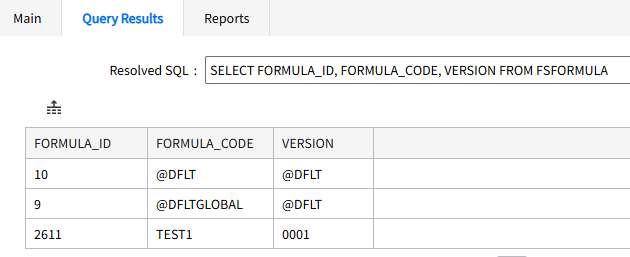
- This example performs a TableLookupEx("ACLFORMULAIDGETALL") with locally constructed arguments ("FORMULA_ID", "FORMULA_CODE", "VERSION") and logs the count of the result table.
-
Result – Retrieved 3 items.
- Example 2
-
Basic DataTable Retrieval.
using System;
using System.Data;
using System.Diagnostics;

public class ActionScript : FcProcFuncSetEventWF
{
    public long wf_start()
    {
        Workflow.MessageList("Check for circular references");

        DataTable dt = TableLookupEx("C_FINDCIRCLES", "mytable", ObjProperty("FORMULAID"));

        if (dt != null && dt.Rows.Count > 0)
        {
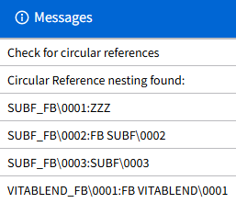
            Workflow.MessageList("Circular Reference nesting found:");
            foreach (DataRow dr in dt.Rows)
            {
                Workflow.MessageList($"{dr[0]}\\{dr[1]}:{dr[2]}");
            }
        }
        else
        {
            Workflow.MessageList("No circular references found");
        }
        return 111;
    }
}
- Query
- SELECT F.FORMULA_CODE, F.VERSION, DESCRIPTION FROM FSCRONFORMULA(@COL_1) R INNER JOIN FSFORMULA F ON R.FORMULA_ID = F.FORMULA_ID ORDER BY 1, 2.
- Description
- This example performs a TableLookupEx("C_FINDCIRCLES") with FORMULA_ID and logs the rows in the result table.
-