TableLookup
You can use the TableLookup function to execute a SQL query and return the value from the first row and first column of the result set. This function provides a quick and efficient way to retrieve a single value from the database.
When to use
You can use this function to:
- Retrieve specific data quickly without processing multiple rows.
- Retrieve data for object types that do not support
ObjPropertyorDataSetfunctions.
When not to use
You cannot use this function to:
- Retrieve values from multiple columns. Use
TableLookupExinstead. - Retrieve datasets from complex queries. Use
TableReaderinstead.
Syntax
object TableLookup(string QueryCode, params object[] QueryArgs);
Parameters
| Parameter | Type | Required | Description |
|---|---|---|---|
| queryCode | string | Yes | The name of the registered SQL query to execute. |
| QueryArgs | params object[] | Optional | The variable number of parameters to pass to the query.
Note: The parameters vary based on the query definition.
|
Return Value
The application returns the value from the first row and first column of the query result if the operation is successful. The returned object is a valid data type for the function.
Prerequisites
- Uses standard named query arguments, similar to
TableLookupExandTableReader. - Returns only the value from the first row and first column of the query result.
Examples
- Example 1
-
Retrieve the value from a query result table.
using System;
class ActionScript : FcProcFuncSetEventWF
{

    public long wf_start()
    {
        object arg1 = "FORMULA_ID";
        object arg2 = "FORMULA_CODE";
        object arg3 = "VERSION";

        object[] argArray = new object[] { arg1, arg2, arg3 };

        object rv = TableLookup("ACLFORMULAIDGETALL", argArray);

        if (rv == null)
            {
                MessageList("TableLookup returned null (no result).");
            }
            else
            {
                string resultString = rv.ToString();
                MessageList("Lookup result: "+ resultString);
            }
            return 1L;
    }
}
- Description
-
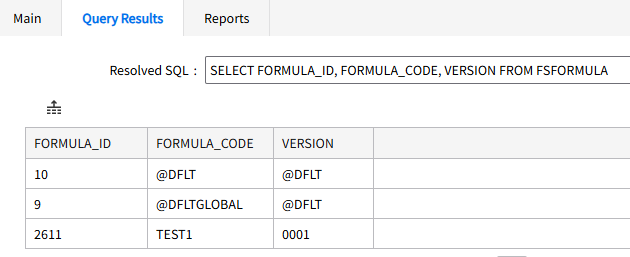
This example performs a
TableLookup("ACLFORMULAIDGETALL") with locally constructed arguments ("FORMULA_ID", "FORMULA_CODE", "VERSION") and logs the returned result.- Query: ACLFORMULAIDGETALL
- Result: 10
- Alternate function call
-
using System;
class ActionScript : FcProcFuncSetEventWF
{

    public long wf_start()
    {

        object rv = TableLookup("ACLFORMULAIDGETALL", "FORMULA_ID", "FORMULA_CODE", "VERSION");

        if (rv == null)
            {
                MessageList("TableLookup returned null (no result).");
            }
            else
            {
                string resultString = rv.ToString();
                MessageList("Lookup result: "+ resultString);
            }
            return 1L;
    }
}