TableReader
You can use the TableReader function to provide a fast, lightweight, and read-only mechanism for reading large datasets. This function is useful when processing large amounts of data that might otherwise result in an out-of-memory exception. Only a single row is loaded into memory at a time, which minimizes memory usage.
When to use
You can use this function to:
- Process data with minimal memory usage when memory resources are limited.
- Process rows sequentially without requiring random access to data.
- Stream data from the database without loading the entire result set into memory.
When not to use
You cannot use this function to access rows in a random order or return to previously read rows.
Syntax
System.Data.Common.DbDataReader TableReader(string QueryCode, List<string> QueryArgsNumbered, Dictionary<string, string> QueryArgsNamed, int DataReaderTimeOut = 30);
Parameters
| Parameter | Type | Required | Description |
|---|---|---|---|
| QueryCode | string | Yes | The name of the registered SQL query to execute. |
| QueryArgsNumbered | string | Optional | Numbered query arguments passed in a List object and not individually specified. |
| QueryArgsNamed | Dictionary<string, string> | Optional | The named query arguments for custom SQL parameters. These values are not automatically wrapped in quotes.
Note: Requires: System.Collections.Generic namespace.
|
| DataReaderTimeOut | int | Optional | The timeout value, in seconds, for long-running queries. |
Automatic Token Replacement
- [%USER] - Current user.
- [%LAB] - Current lab.
- [%GROUP] - Current group.
- [%%CURRENT_DB_NAME] - Current database name.
- [%%SEARCHTABLE] - Available only during Searchs PostSearch event.
Return value
The application returns an ADO.NET DbDataReader object for reading query results if the operation is successful.
Prerequisites
- You cannot return to previously read rows once they have been processed.
- Rows must be read in sequence.
- Add Imports System.Data.Common (VB.NET) or using System.Data.Common; (C#) at the beginning of the script.
Examples
- Example 1
-
Basic DbDataReader Retrieval.
using System;
using System.Data;
using System.Collections.Generic;
using System.Data.Common;

public class ActionScript : FcProcFuncSetEventWF
{
    public long wf_start()
    {
        DbDataReader tpReader = TableReader("ACLFORMULAIDGETALL", null, null);

    if (tpReader == null)
    {
        MessageList("Unable to open");
    }

    // Use the reader and ensure it is disposed
    else
    {
        while (tpReader.Read())
        {
            // Check for DBNull before converting; index is zero-based (1 => second column)
            object fieldObj = tpReader.IsDBNull(1) ? null : tpReader.GetValue(1);
            string Field1Value = fieldObj?.ToString();

            // Do something with Field1Value
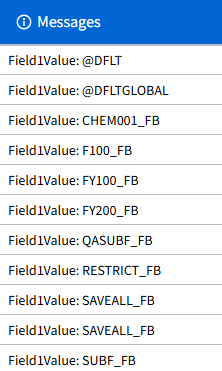
            MessageList("Field1Value: " + (Field1Value ?? "<null>"));
        }
    }

    return 1L;
    }
}
- Description
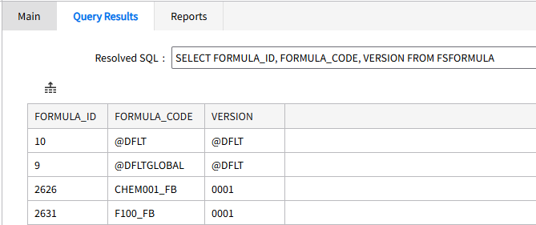
- This example performs a TableReader("ACLFORMULAIDGETALL") and logs the result from query result table.
-
Result – Retrieves the entire column of FORMULA_CODE.
- Result
-