Optimization endpoints
The Optimization Endpoints Overview page displays endpoints that have been created from your models. It shows the name, description, status and last update of the endpoints.
You can select an endpoint from the list to activate, deactivate, or delete. You must deactivate an endpoint before you can delete it. Additionally, you can select an endpoint and update the description.
The name of the quest from which the endpoint has been generated is displayed and you can drill down into the quest.
Click to download the schema for the endpoint in JSON format on your local system.
Optimization endpoint history logs
Select the second tab under Optimization endpoint details to view the endpoint history logs. This information is displayed:
- Last Updated by username
- Last Updated on date and time
- Event Description: when the endpoint was created, activated or deactivated
Optimization endpoint status
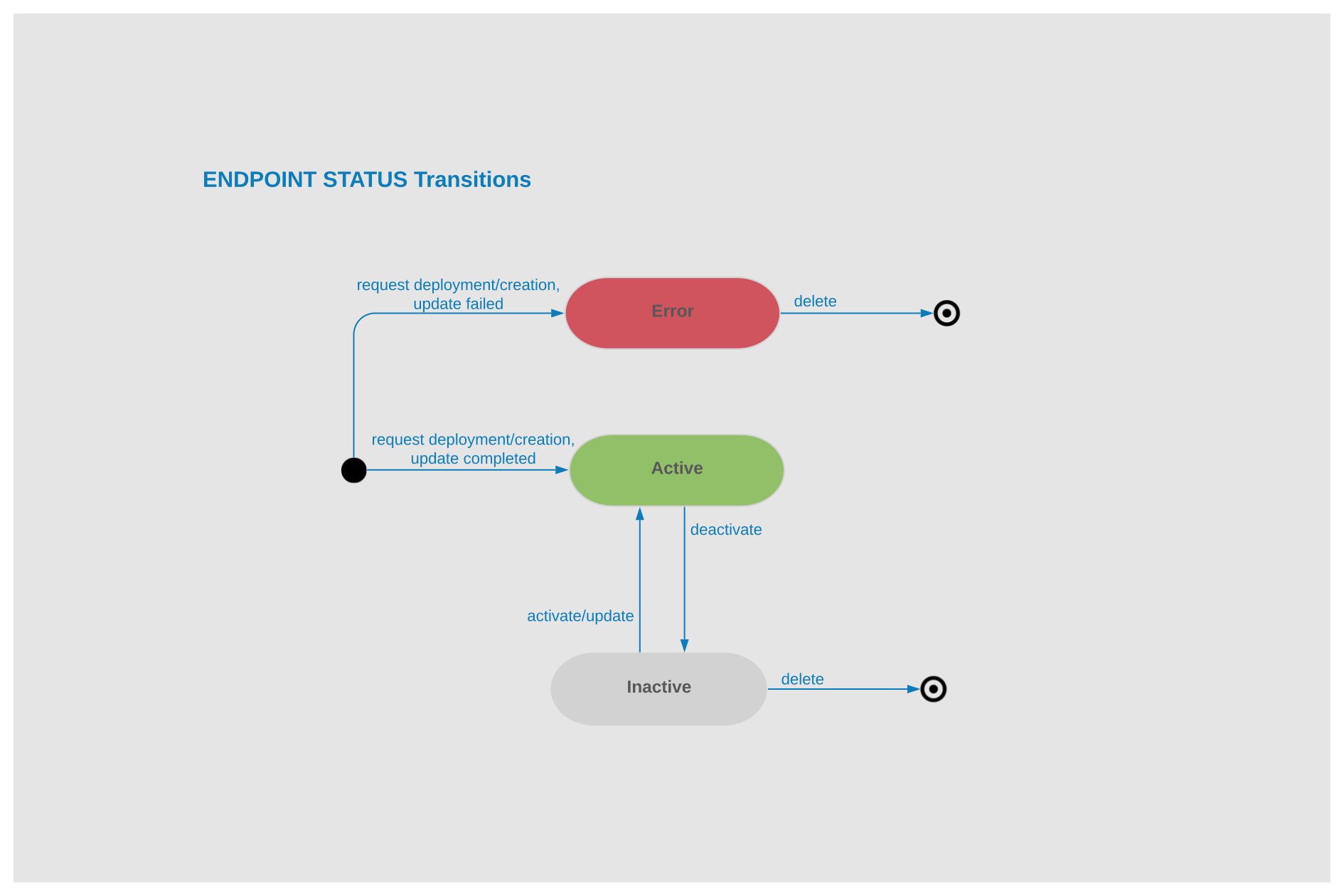
When you deploy an endpoint and the creation is successfully completed, the status is changed to Active. If there is a failure, the status is Error.
When you update an endpoint from the real-time production quest, the status is Active. The last Active version of that endpoint is still active while the update is in progress, until it is finally replaced with the newly created one.
When you deactivate or activate an endpoint, the status is Deactivating or Activating state until it is changed to Inactive or Active.
While an endpoint is Active, you cannot delete the quest from which it has been generated. You must deactivate the endpoint first.
Using the optimization endpoint as an adopted application
The deployed endpoints are accessible in API Gateway to:
- Get a list of registered endpoints.
- Get the schema of an endpoint.
- Retrieve an optimized value for a given endpoint.
This table shows the process of calling the endpoints:
| Endpoint | /optimization/v1/endpoints | /optimization/v1/endpoints/{endpoint name}/schema | /optimization/v1/endpoints/ {endpointName}/execution |
|---|---|---|---|
| Method | GET | GET | POST |
| Type | List | Schema | Optimized details |
| Description | Retrieve a list of registered endpoints which are in ACTIVE state. | Retrieve the schema of endpoint based on the endpointName. Use this schema to frame the input for the endpoint-execution method. | Get the optimized details of the endpoint based on the input provided. |
| Input | Status: Active | endpoint name | endpointName and input values to get optimized details. For Fast-track endpoints, the schema is flexible, there is no predefined request structure. This example is the ION API request for old endpoints with implementation of custom endpoint schema This example is the ION API request for new endpoints with implementation of custom endpoint feature: |
| Output | Endpoint & quest details | JSON schema foe the selected endpointName | Results of endpoint execution |