Components
- Data Collection
- Datasets
- Groups
- Machine Learning
- Quests
- Training quest
- Production quest
- Realtime production
- Batch production
- Endpoints
- Easy ML
- Custom Algorithms
- Algorithm Quick Reference
- Quests
- Optimization
- Quests
- Fast-track deployment
- Realtime production
- Design and deployment
- Design quest
- Production quest
- Realtime production
- Batch production
- Fast-track deployment
- Endpoints
- Custom Algorithms
- Fast-track CA
- Standard CA
- Custom Algorithms
- Solver Quick Reference
- Quests
- Decision Manager
- Configuration Management tags
- About Artificial Intelligence
Data collection
This module represents collection of datasets and associated activities enabling these to be used in subsequent modules for predictive and prescriptive analytics.
Datasets
A dataset contains the data that is used as input. A dataset can be uploaded from your local system or imported from Data Lake.
The data must be in a delimited format, such as a .csv file. Metadata is defined for the dataset to specify the columns in the data and the data types.
After the dataset is uploaded to the application, the ML quest can be modeled to make use of the data or group to feed into Optimization quest.
Groups
A group is the collection of single or multiple datasets. It is created from the pool of datasets that are available in Data Lake or uploaded to Infor AI. This step is currently used for designing the optimization module. It is not applicable to the Machine Learning module.
Machine learning
The machine learning module represents a set of activities intended for datasets processing, model creation, training, testing, evaluation and deployment.
Machine learning process diagram
This diagram shows the general machine learning modeling process:
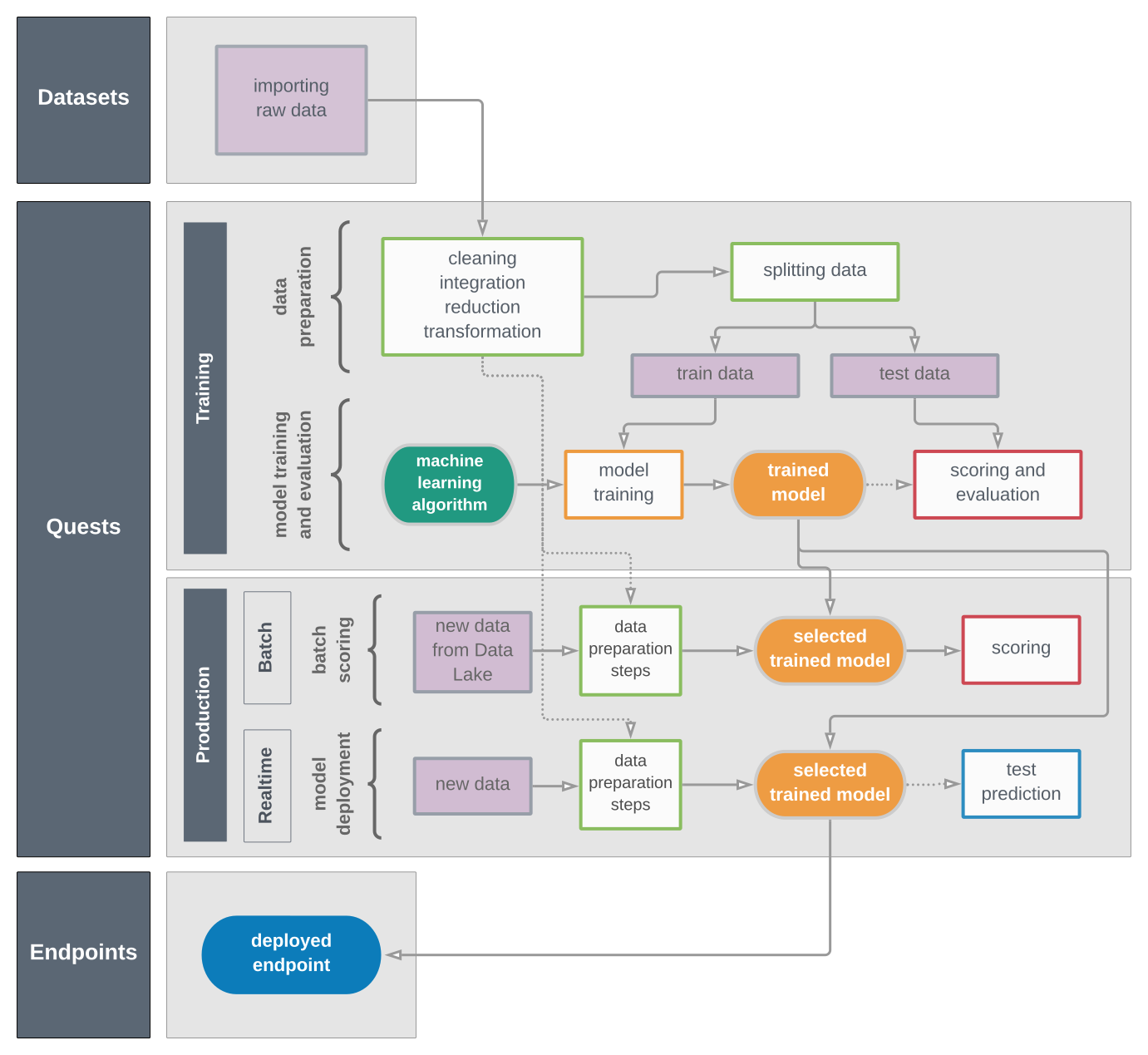
- Datasets: Import your data and save it in an accessible format for further processing.
- Quests: Prepare the data, apply an algorithm, train the model, and evaluate the model. Deploy the model to acquire predictions.
- Endpoints: View and test the deployed models.
Quests
A quest is the flow of activities that make up the AI model.
In the model there are several stages in the machine learning process:
- The quest starts from a dataset.
- Pre-processing steps are used to prepare the data by cleaning or transforming it.
- One or more algorithms are applied, and the model is trained.
- The outcomes are scored and evaluated.
- The best model is taken into production.
Endpoints
The endpoint is deployed from the real-time production quest. The endpoint represents the deployed model that is called to get real time predictions.
Easy ML
You can use the Easy ML feature to run experiments and create machine learning models.
In Easy ML you are guided through a multi-step process where you provide the dataset and general guidelines, assisted by automatic suggestions. All data science actions are performed automatically based on pre-defined logic integrated behind the scenes.
After the experiment is complete, you can generate a corresponding machine learning quest from the results for further manual tuning and model deployment.
Custom algorithms
You can package and deploy custom algorithm code in Infor AI.
After the custom algorithm is registered and deployed, you can use it in a quest to train a model and expose the model through an endpoint.
Algorithm Quick Reference
You can use the Algorithm Quick Reference to decide which algorithm, from the catalog of available algorithms, is most suitable to be applied to train the model, depending on the business case you are trying to solve, and the data that you have available.
Optimization
The Optimization module represents a set of activities intended for data groups processing, optimization model design and creation, review of the outputs across different solvers, and deployment of the best outcome.
Optimization platform process diagram
This diagram shows the general Optimization modeling process:
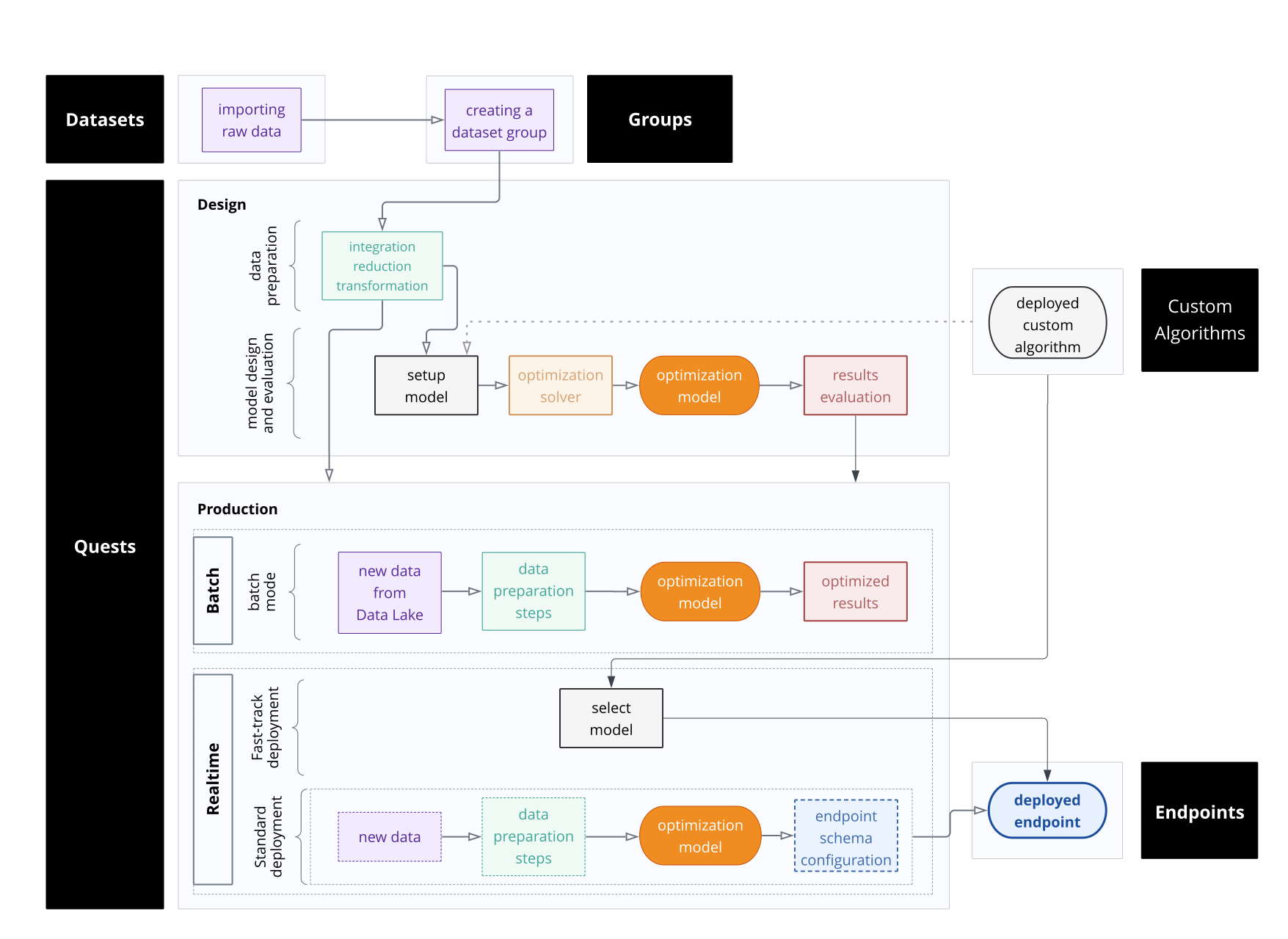
- Data Collection
- Datasets: Import your data and save it in an accessible format for further processing.
- Groups: Collect multiple datasets in a single group so as to fed these multiple datasets to the quest in a single go.
- Optimization quests: Select the respective group (multiple datasets), prepare the data, build the optimization problem using setup model, select the configured setup model and apply the respective solver using optimize model activity and run, and then review the results of the model. Move the most optimized problem to production and deploy it to run for real time.
- Endpoints: View and test the deployed models.
Quests
A quest is the AI model that you build and deploy. These approaches are available:
- Fast-track deployment
- A streamlined user interface designed for efficient workflows, featuring a single Select model activity to configure and deploy custom algorithm models as real-time endpoints.
- Design and deployment
- In design and deployment, there are several stages involved in
process:
- The quest starts from selecting the group created in data collection step.
- Pre-processing steps are used to prepare the data by cleaning or transforming it. Single or combination of datasets can be prepared in the optimization platform. Currently, the application supports three datasets to be joined and prepared at a time by applying the respective transformation activities.
- The quest allows you to create one, or multiple. setup models where sets, indices, constants, decision variables, constraints, and objective functions are defined preparing the mathematical model.
- There are multiple predefined solvers available in the optimizer that are applied on the prepared mathematical model to solve. The optimizer executes and resolves the problem, generating the most optimal solution.
- The outcomes are evaluated that are generated under results activity.
- The best model is taken into production.
- In design and deployment, there are several stages involved in
process:
Endpoints
The endpoint is deployed from the real-time production quest. The endpoint represents the deployed model that is called to get real time predictions.
Custom algorithms
You can package and deploy custom algorithm code for optimization module in Infor AI.
After the custom algorithm is registered and deployed, you can use it in a quest to expose the model for consumption. The custom algorithms can be packaged and deployed as follows:
- Fast-track CA: This custom algorithm is registered for use in the Fast-track deployment quest and can be exposed as a realtime endpoint.
- Standard CA: This custom algorithm is registered for use in the Design and deployment quest and can be exposed for batch consumption or as a realtime endpoint.
Solver Quick Reference
Use the Solver Quick Reference to decide which solver is the most suitable from the list of available solvers based on problem type. The solvers are mapped to the various problem types that are possible in the Optimization module.
Decision Manager
You can use Decision Manager to model, and evaluate, decisions. To model a decision you configure a decision plan. A plan is composed of:
- Data dictionary that represents the business knowledge model
- Rule decisions
- Activation
- Attirbutes
- Rule facts
- Attributes
- Rule definition
- Arbitration
A plan configuration can be tested and then activated. Once activated, an Infor API Gateway endpoint is available so that the decision plan can be evaluated as part of your business process.
Configuration Management tags
You can create local packages containing content for Infor AI, such as datasets, groups, quests, endpoints, and custom algorithms for both modules: Machine learning and Optimization. The package is created from a source tenant and can be deployed to a target tenant.
The creation of packages takes place in Infor CloudSuite Self-Service Portal (CSSP). You can create packages manually by selecting individual items, or you can use tags. When creating a package based on tags, only content that is assigned to the selected tags within the Infor AI application are included.
See the CloudSuite Self-Service Portal documentation library on docs.infor.com for information.
About Artificial Intelligence
This option provides the version number and the copyright notice.