Dataset status
Before you save a dataset, the data is available to preview, and the
status is No data loaded. You must save the dataset for
the dataset to be available in the correct format for the quest and to process the dataset
further through the application.
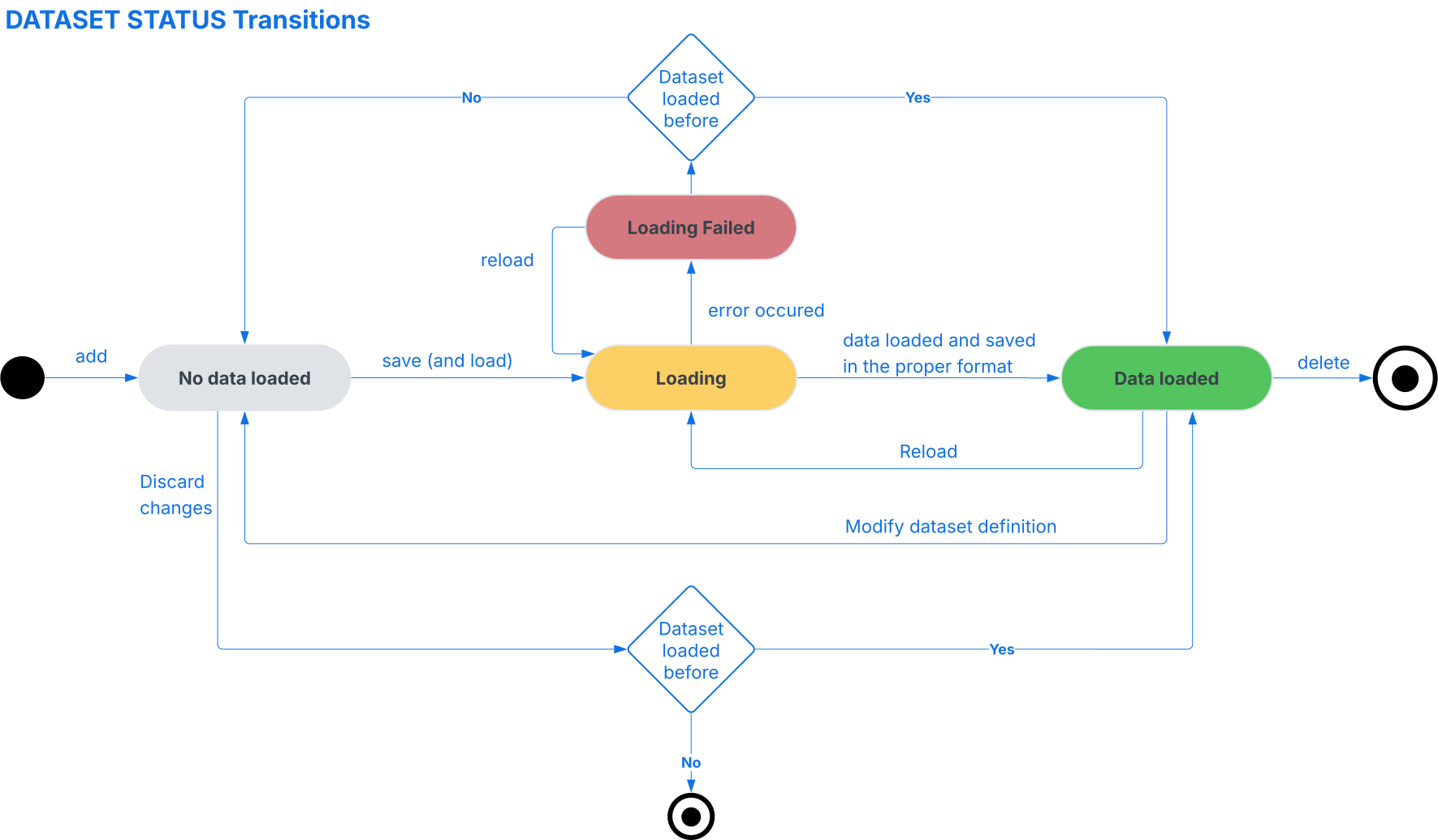
After you click , the dataset status is Loading. When loading is completed, the status is set to either:
- Data loaded: The dataset was loaded successfully and can be used in quests and other configurations.
- Loading failed: An error occurred during loading.
- If the status is Loading failed, you can try to reload the dataset
or cancel the loading.
- If you cancel the loading for a new dataset, the status is set to No data loaded.
- If you cancel the loading for an existing dataset, the status is set to Data loaded. In this case, the dataset returns to the last successfully loaded version.
- When the dataset status is Data loaded and the data import method
is SQL query, you can edit the SQL query in the dataset editor:
- You can freely change the SQL query even when the dataset is already loaded.
- Click to run the current version of the query and see sample data. This validates your changes without updating the active dataset yet.
- When you are satisfied with the result, click . The dataset status changes to Loading again. After processing, the dataset status changes to either Data loaded or Loading failed.
Note: When you upload a dataset from a file, the icon is not available. In this case, you only
need to save the dataset using .
This diagram shows the status transition of the dataset: