Optimization custom algorithms
When the equation building option does not meet your requirements, you can bring your local code package and deploy it as a custom algorithm code.
Custom algorithms can be used for control over the entire data science pipeline. You can package and deploy your own custom algorithm code, apply a solver embedded in the optimization module, or use the custom solver option to initialize the solver directly from the custom algorithm code and run the quest to generate the optimal solution supplying the new runtime input data.
The maximum allowed size of the custom algorithm docker image is 50 MB.
You can bring in the custom algorithm code by uploading a prepared source code file. The custom algorithm source code file must contain optimizer.py script. This is the program that is invoked to execute the design quest.
The custom algorithm source code file must be compressed (zipped) and contain the optimizer.py script placed in the top-level directory. The supported programming language for the scripts is Python.
The hyperparameters are passed in a hyperparameters.json file as a JSON-formatted dictionary of hyperparameter names to values.
Other supportive routines and programs can be included and packed within the compressed source file.
There are two types of custom algorithms available:
- Fast-track custom algorithm: This type allows for rapid deployment by skipping the multi-step design and production quest process. You can create a realtime production quest directly from the custom algorithm detail page and deploy it as a realtime endpoint.. Fast-track custom algorithm is intended exclusively for deploying real-time endpoints using fast-track compatible algorithms.
- Standard custom algorithm: This option supports the full design and production workflow. It enables you to build, run, and evaluate your model before moving it into production. Standard custom algorithm supports both real-time and batch modes, offering greater flexibility and control over model development and deployment.
Python version
The currently supported Python version for your custom algorithm code is 3.12, along with the respective installed Python libraries. The full list of Python libraries can be found in the "Python libraries" section of this guide.
Custom algorithm examples
Click the Instructions tab for more detailed information on custom algorithms. This tab contains example files that you can download. Use the example files to view an outline of the required structure and contents.
Custom algorithm status
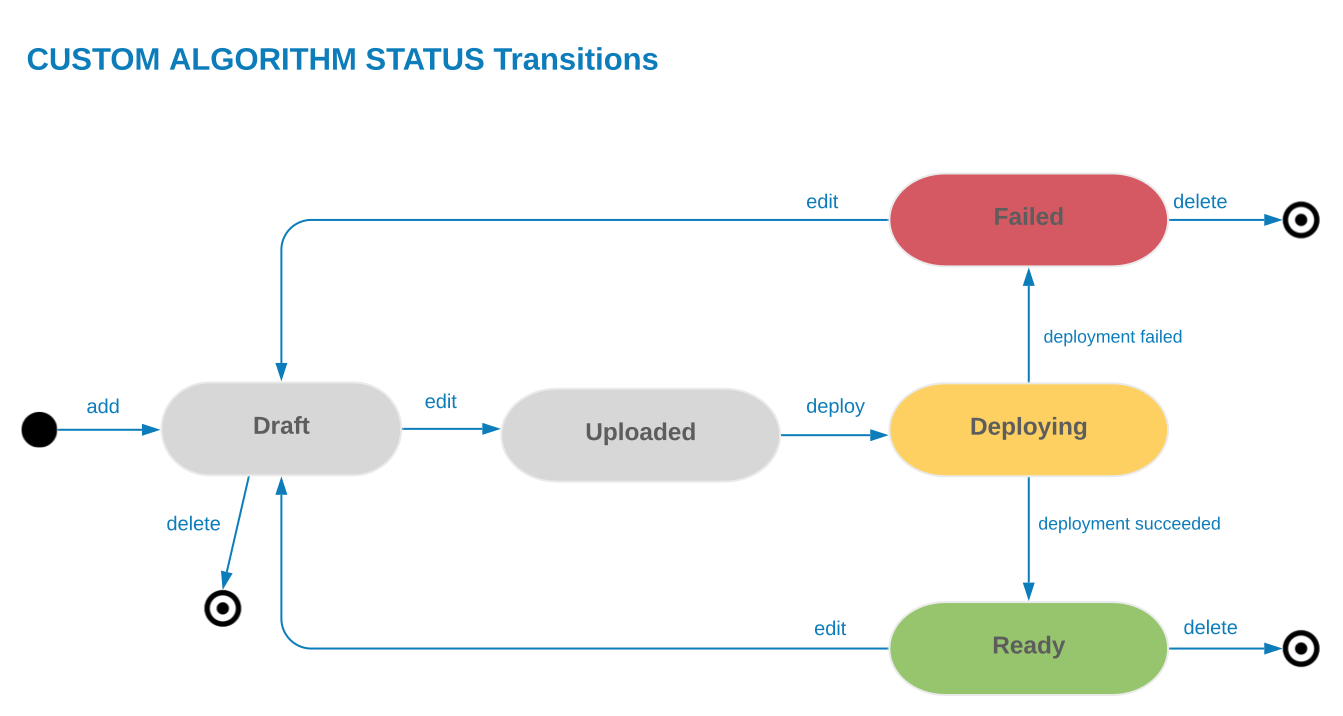
When you start building the custom algorithm, the status is Draft. Upon saving, the status changes to uploaded. After you click the Deploy button, the status changes to Deploying. When deployment is successfully completed, the status is changed to Ready. If the deployment is unsuccessful, the status is Failed.
After the custom algorithm is deployed and the status is Ready, you can use it in the design quests and run to achieve the optimal solution.
You cannot delete a custom algorithm when it is being used in a quest.