Networked BI: Sharing and Blending Data
Important: This topic references the Flash user interface.
Adobe plans to end-of-life Flash in 2020. Support for Flash will be fully removed from most browsers in December 2020, including Google Chrome, Mozilla Firefox, and Internet Explorer. In response, Birst will no longer support the Flash user interface following the 2020 deprecation.
For more information, see Scheduled Changes To Birst Platform.
The benefits of the Birst two-tier analytics platform include:
Data Blending: Blend individual data with centralized master data, without data movement or replication, and while maintaining enterprise security policies.
Extend the Value of Current Data Assets: There is no need to make changes to the parent space's data store.
Self-Service BI: Empower users to easily create their own space with enterprise data from the parent space's data store.
Standardized Business Logic: Establish core business definitions in the parent space and share throughout the organization. Maintain a unified business model while allowing parallel model development.
Rapid Data Distribution: Create menus of data subject areas that users can flexibly access and combine on the fly without IT provisioning.
There are different ways to provide reports and dashboards that use data from multiple data sources or spaces, inside or outside of Birst.
Managed Data Mashups
Share data between Birst
spaces using Admin - Customize Space - Packages. Managed data mashups
are ideal for providing subsets or customized views of centralized data
across the enterprise. A parent space shares data with child spaces,
and the child spaces cannot update data in the parent space. Child spaces
have reports and dashboards that contain information from both the parent
and child spaces. See Managed
Data Mashups.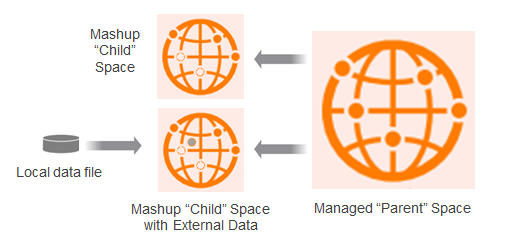
For even more flexibility, a child space may itself have local Live Access
data from other resources.
Tip: Managed Data Mashups using Packages is an add-on feature. To see the Packages tab the account must be enabled for the feature. To enable it for your account contact your Infor Representative.
Live Access Federated Data
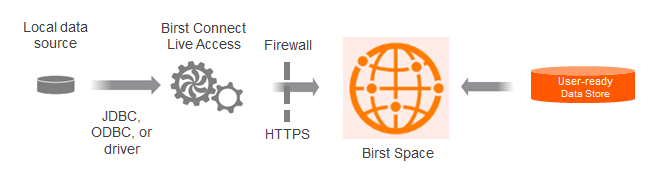
Blend data between a Birst data store and data from outside of Birst. The external data is not copied into Birst, and real-time access means the data is always current. Use Birst Connect and Live Access to securely connect to other data sources in your enterprise. Live Access federation is supported across:
Two Live Access relational database sources (no XMLA at this time)
A source in a Birst data store and a Live Access source (RDBMS or XMLA)