KPI Builder 2.0
KPI Builder 2.0 provides a flexible, interactive method to create KPI visualizations.
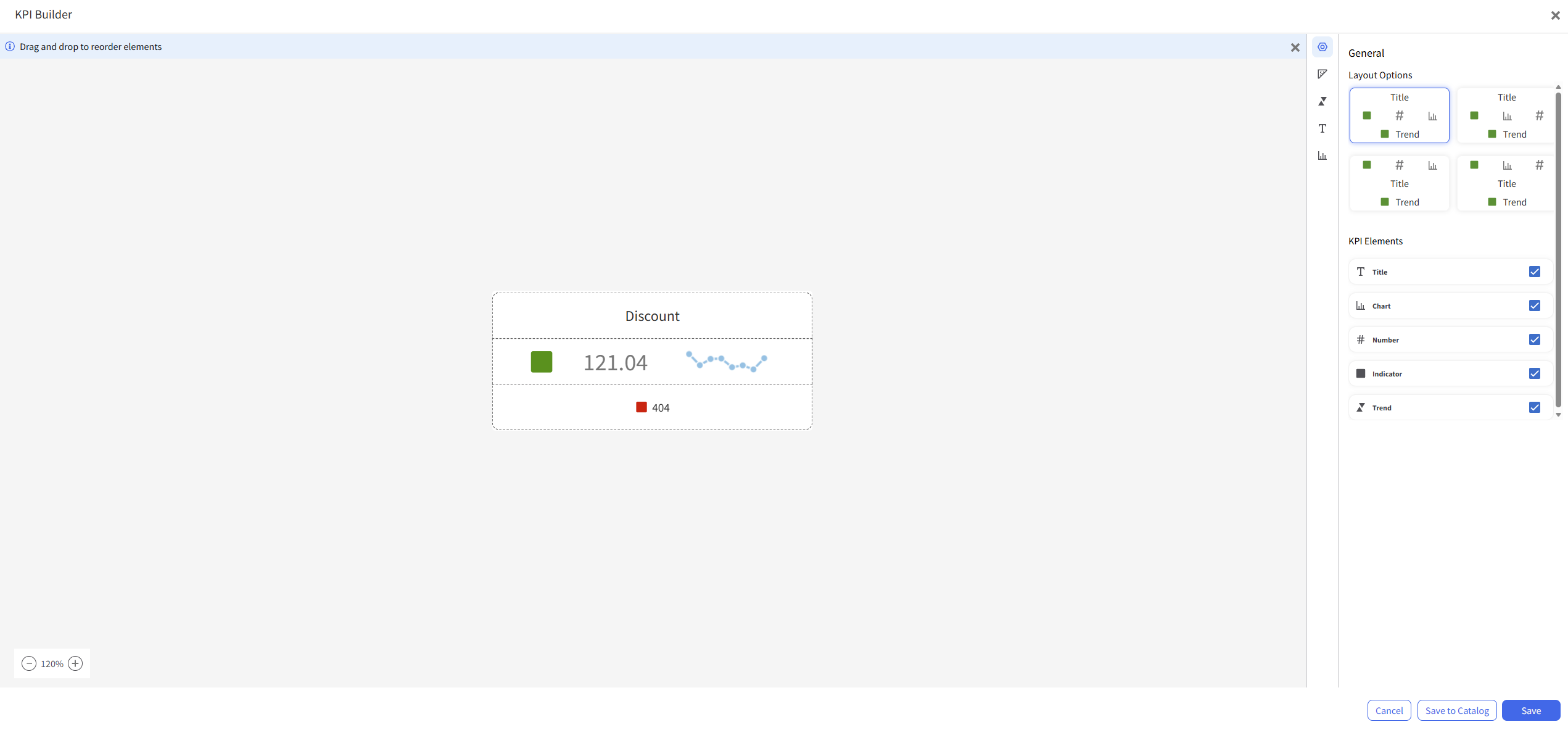
KPI Builder 2.0 simplifies KPI creation and provides control over how KPI data is displayed and organized. You can configure KPI components, customize appearance, and arrange elements in layouts with a live preview.
When you create a KPI, choose KPI Builder 1.0 or KPI Builder 2.0.
KPI Builder 1.0 supports the existing KPI authoring experience. KPI Builder 2.0 provides an enhanced authoring experience. The selected builder determines the authoring environment for the KPI.
Note: Existing KPIs created with KPI Builder 1.0 can only be edited in KPI Builder 1.0. New KPIs that you create with KPI Builder 2.0 can only be edited in KPI Builder 2.0.
Key enhancements:
- Select from multiple KPI layouts that support different presentation styles.
- Enable or disable KPI elements, such as Title, Measure, Indicator, Trend, and Chart.
- Drag and drop KPI elements to reorder or swap positions within a layout.
- Configure separate measures for KPI value, trend, indicator, and chart.
- Apply built-in styling options for colors, fonts, and visual formatting.
- Use multiple chart types in KPI visualizations.
- Search for existing measures or create report expressions during configuration.
- View KPI updates in real time before saving.
- Save KPI configurations to the catalog for reuse across dashboards and reports.